Facebook Messenger is the #2 most downloaded iOS and Android app of all time and over 1.3 billion people use Messenger every month to communicate with their friends and family.
So if you’ve been on the fence about using Facebook Messenger bots to market your ecommerce store, here are some facts that might tip you over the edge.
- Facebook Messenger is growing at a rate of 600K users per day.
- Facebook Messenger’s reach will eventually include Instagram and WhatsApp users
- Facebook Messenger ads are incredibly cheap right now and cost around $.02 per subscriber
- Facebook Messenger can drastically reduce your customer support costs.
When I first heard about Facebook Messenger marketing, I was skeptical that people would tolerate marketing messages in their inbox. But I was completely wrong!
After using chatbots to market my handkerchief store for the past several years, I discovered that Messenger marketing is significantly more efficient than email.
In fact compared to email, Facebook Messenger offers….
- A 5X increase in open rates
- An 8X increase in click-through rates
- A 3.5X increase in revenue per subscriber
Right now, Facebook Messenger marketing is still in its infancy and there’s a long way to go until this platform becomes saturated. In fact, only 1% of businesses are using chatbots today.
As a result, there is no better time than now to take advantage of Messenger’s incredible benefits for your ecommerce store.
Here’s how I’m using the Facebook Messenger platform to grow my sales..
What Is A Facebook Messenger Bot?
A Facebook Messenger bot is automated messaging software that uses artificial intelligence (AI) to interact with your customers.
Using a tool like ManyChat, you can program your bot to answer questions automatically and save you time and money with customer support. You can also use your bot to gather leads and generate sales on autopilot.
In fact, Facebook Messenger is a lot like email in that you can build up a subscriber list and send broadcasts to your list.
But the key advantage of Facebook Messenger over email is that the open and click through rates are significantly higher.
For example, whenever I receive an email, I rarely open it right away and sometimes I forget about it altogether.
But I always remember to check my Facebook messages. For me, Messenger is a much more personal form of communication that I reserve for friends and family.
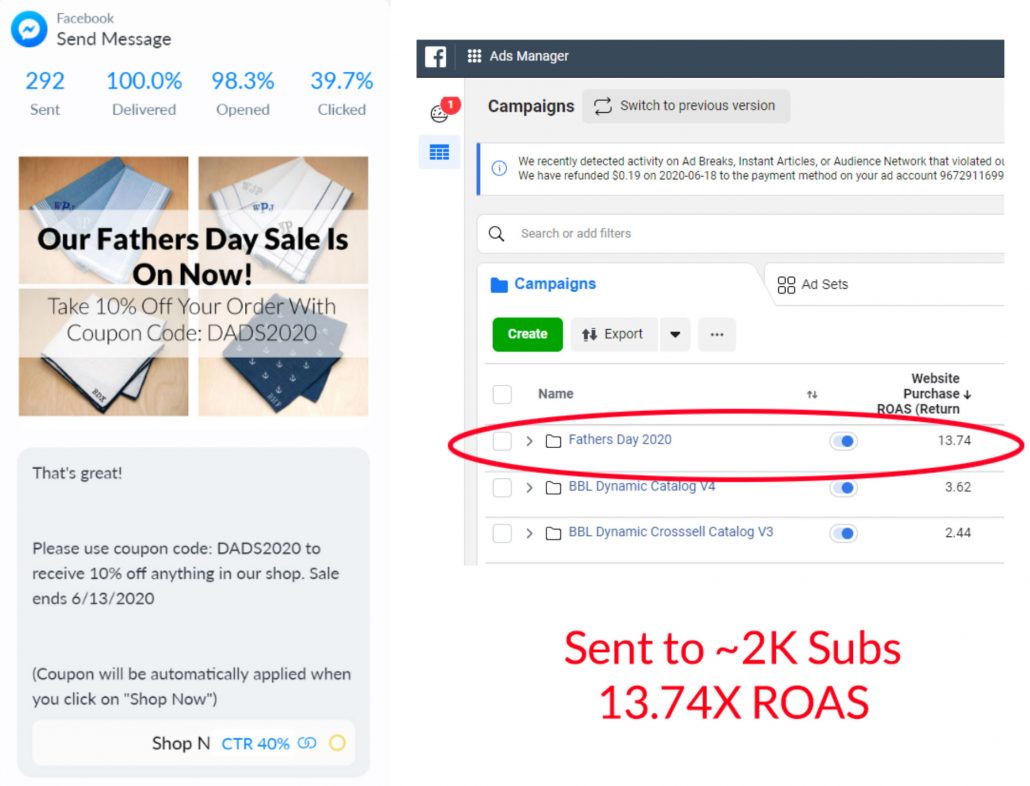
To give you an idea of how powerful Facebook Messenger marketing bots can be, here’s a snapshot of a targeted broadcast that reached 1888 people where 292 recipients clicked on the message. The return on ad spend for this broadcast was 13.74X.
The Rules Of Using Facebook Messenger
Now you are probably wondering why I’m quoting “return on ad spend” numbers for Facebook Messenger. After all, shouldn’t sending messages to your subscriber list be free like with email?
The primary difference between email and Messenger is that with the exception of a few cases, Facebook forces you to pay to reach your audience through the use of Facebook Sponsored Message ads.
Here are the exact rules you must obey.
The 24 Hour Rule
You are only allowed to send free promotional messages to a subscriber within 24 hours of their last response. This means that you can not blast your entire subscriber list with random coupons and sales whenever you feel like it.
If you want to send a promotional message outside of the 24 hour window, you have to pay to play. Right now, I’m paying roughly $.02 to reach a subscriber which is very inexpensive.
Non-Promotional Messages
You are allowed to send non-promotional messages for free outside of the 24 hour window but only if they fall under the following guidelines.
- Confirmed Event Update – You can remind a customer of a scheduled event that they opted in to attend
- Post Purchase Update – You can give a customer an update on their order
- Account Update – You can give a customer an update on their account status
- Live Chat Human Update – You can chat with a customer 1 on 1 in real time
Most tools will allow you to send broadcasts to your entire list whenever you feel like it and it is up to you to make sure that you obey the rules.
I’ve seen many companies get away with sending free promotional messages but if you break their rules, Facebook will eventually ban you.
Remember, you are only allowed to send coupon codes and sales after a subscriber has interacted with you within 24 hours or if you pay for Facebook Sponsored Message ads.
Therefore, to avoid getting banned with your free messages, you have to get creative in how you interact with your customers.
For example, instead of outright blasting an offer, you can ask your customers questions to get them to reply during a post purchase update and then follow up with an offer.
But in most cases, you’ll have to pay for ads to reach your entire subscriber base.
Facebook Messenger Automated Ecommerce Flows
Similar to email, you can have your Facebook Messenger bot send automated messages to your customers. As long as the messages you send fall within the 24 window, you can send targeted messages to close the sale.
Here are the automated flows that I’m currently running for my store.
Abandoned Cart Recovery
Whenever a customer starts checkout but doesn’t complete the process, my chatbot will send them an automated message 4 hours later to remind them to finish their order.

In this message, a customer is shown the exact contents of their cart along with a “Checkout Now” button which takes them directly to checkout.
Browse Abandoned Cart Recovery
Whenever a customer looks at a product but doesn’t add to cart, my chatbot will send them an automated message several hours later to remind them to add this item to their cart.

In this message, a customer is shown a picture of the product they were looking at along with a “Shop Now” button which adds this item to their shopping cart.
Order Confirmation
Whenever a customer checks out, I send them a confirmation message and try to entice them to come back and shop for more products if they respond.
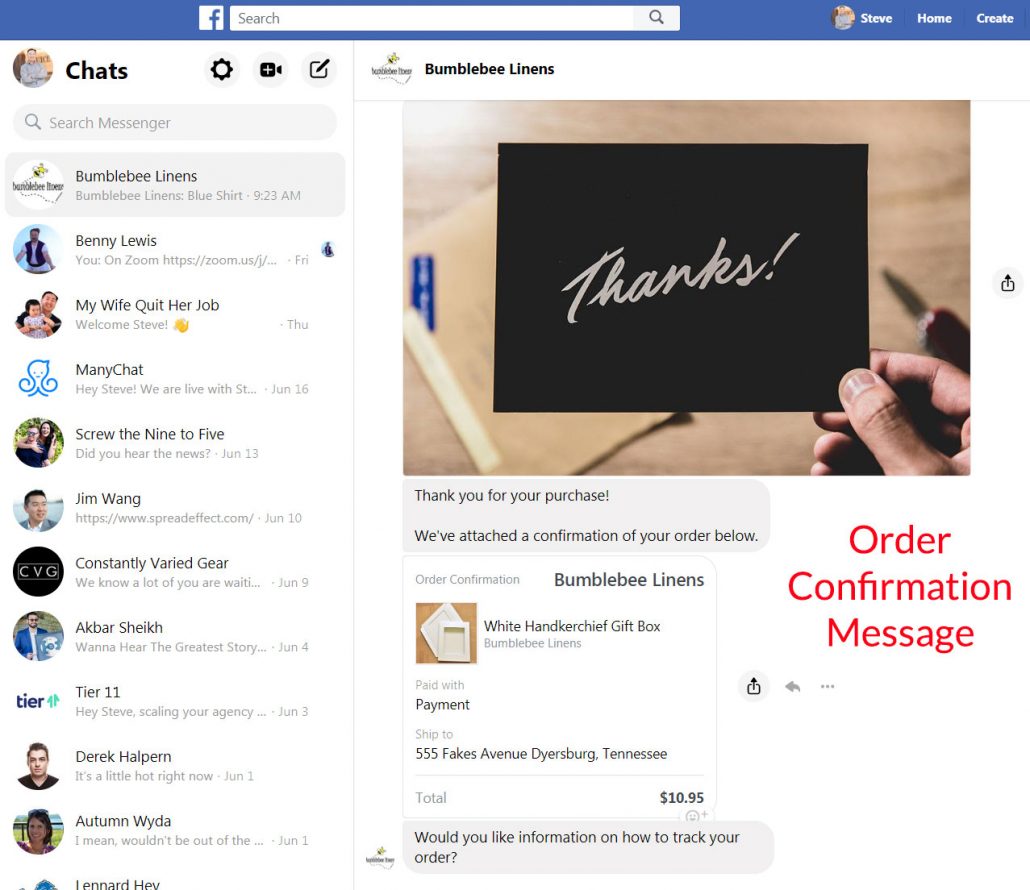
I also encourage customers to join our customer loyalty program.
All Of These Flows Make Money On Autopilot
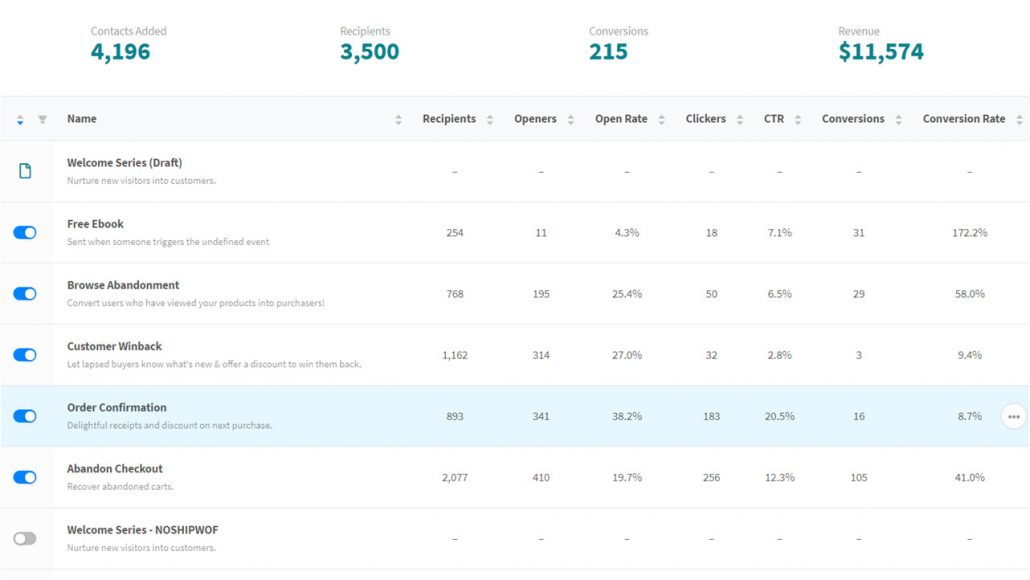
All of the Messenger flows described above make money on autopilot. And because they do not violate any of Facebook’s rules, they can be run indefinitely for free without your intervention.
Here’s a snapshot of how much money these automated flows generated for my store last quarter.
Implement A Facebook Messenger Loyalty Program
Customer loyalty programs are one of the most effective ways to boost customer retention.
And according to Bain and Co, a 5% increase in customer retention can result in a 75% increase in revenue.
For Bumblebee Linens, while only 12% of my customers are repeat, they make up over 36% of my revenues.
Studies have also shown that 69% of customers are influenced by retailers that offer loyalty and rewards programs and 58% shop more often at stores where they’ve joined a loyalty program.
Even though there are many “off the shelf” loyalty programs that you can pay for like Smile.io, if you’re cheap like I am, you can implement a loyalty program for free via Facebook Messenger and build your list at the same time!
How My Messenger Loyalty Program Works
My loyalty program chatbot begins by asking a customer whether they want to join my rewards program. If they click “yes”, they can now be messaged about anything within 24 hours, as per Facebook’s terms of service.
Then, I ask the customer to provide the exact email address that they used to place an order in my store. This is important because email is the primary way I use to track orders.
Once they sign up, I tag them as a loyalty program member and reward them with 50 free bonus points. Their point totals and their email addresses are all stored within ManyChat.
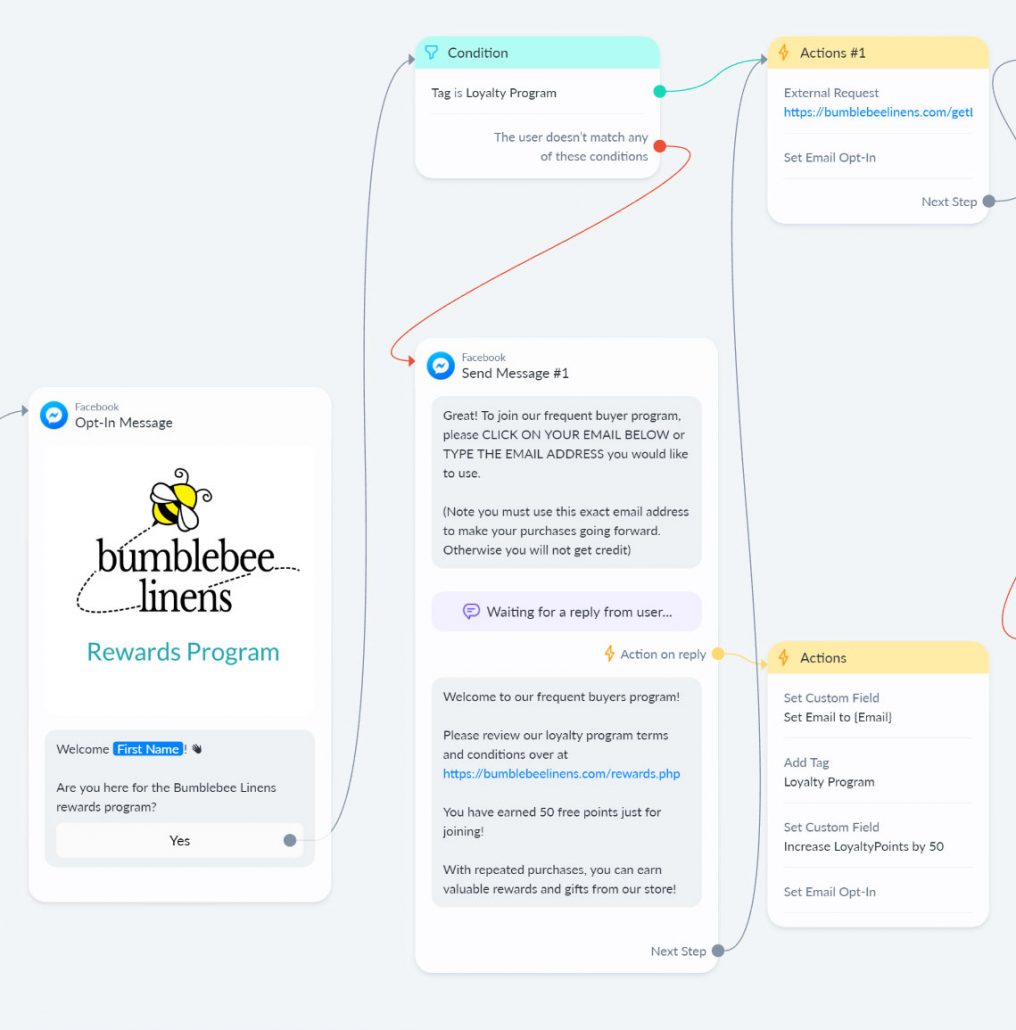
Once a customer places an order, I provide them with a special Messenger link which embeds the order number and passes this information along to ManyChat.
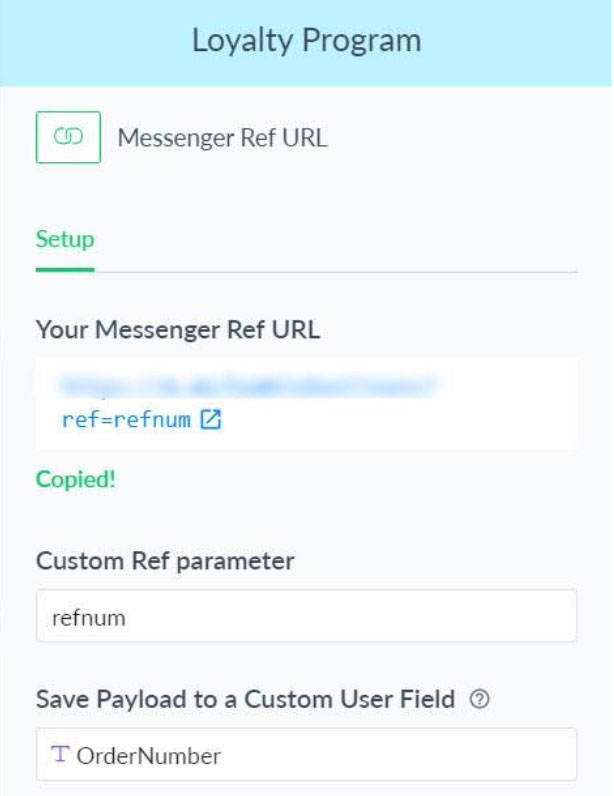
This order number is then stored in a custom “Order Number” field.
If the customer is a member of the loyalty program, ManyChat sends the customer email address along with the order number to my website to verify that it is in fact a valid order.

If the order is valid, then:
- The number of loyalty points is incremented by the last order value.
- The order number is added to the list of redeemed orders in ManyChat. This list is used to ensure that the customer doesn’t try to redeem the same order twice for points.
- The customer is thanked for their order, given their new points total, and invited to check out what prizes they can redeem.
Redeeming Prizes
Redeeming points for rewards is completely automated. When a customer has accumulated enough points to redeem a free prize, they simply click on the reward.
If the customer has enough points, ManyChat pings my website and a coupon code is sent to the customer along with instructions on how to redeem their prize.
If the customer doesn’t have enough points, they are given their point totals and encouraged to continue shopping.
For all of my rewards, I purposely do not include free shipping because I want customers to shop for other items in addition to their prize.

The beauty of this loyalty program is that it’s 100% automated. In addition, I also set up ManyChat to email my customers every 28 days to remind them of their point totals to encourage more shopping!
Use Facebook Messenger To Reduce Customer Support
Every online store has to answer the same repetitive questions and you can use a Messenger bot to reduce your customer support load.
I do this by using keyword automations within Facebook’s messenger bot. This is a tool that recognizes keywords in a customer’s chat entry and responds with appropriate, automated messages.
Here’s an example from my shop.
If a customer types “How long will it take to receive my order” into the Facebook Messenger chat window, they get the following series of responses:

Because customized products in my shop take longer to fulfill, I’ve programmed my messenger bot to first ask the customer if they are purchasing a personalized product.
- If they click “Yes”, they are told that it takes up to five business days for their order to ship.
- If they choose “No”, they are told that their order will ship the following day.
To implement this functionality into your Facebook Messenger bot, you can use ManyChat to recognize certain keywords and answer the majority of your commonly asked customer support questions.
For example, Bumblebee Linens is often bombarded with questions such as:
- Do you ship internationally?
- Do you sell wholesale?
- Do you offer discounts?
We’ve programmed all of these with pre written responses to help alleviate the pressure on our customer service team.
Only if a customer asks a question that we do not have an automated answer for, do we connect them with a member of our customer support team.
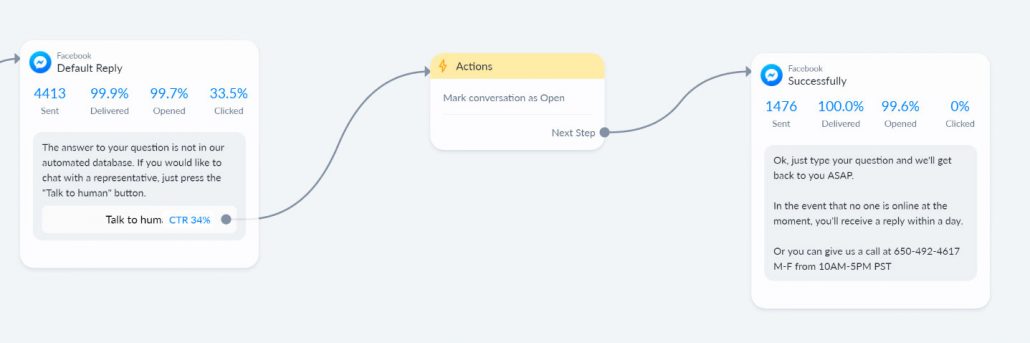
As soon as the customer clicks on “Talk to human”, I get a notification in ManyChat that my customer service team needs to act.
How To Grow Your Facebook Messenger Subscriber List
The ability to send broadcast messages and automated flows can not be accomplished unless you get your visitors to opt in to your Messenger bot.
But what’s nice about Facebook Messenger is that a visitor only has to interact with your bot a single time in order for them to become a subscriber. As a result, it is extremely easy to quickly build your subscriber list.
The rest of this article will show you different ways to build your Messenger following for your ecommerce store. You can then use these lists to generate sales, launch products, and get reviews.
Ideally, you should use these strategies in combination with your email gathering efforts. Because Facebook controls the Messenger platform and changes the rules all of the time, I always prioritize email over Messenger.
In fact, here’s what I try to grab in order of priority.
- Email address
- Messenger subscriber
- Push notifications
- Retargeting pixel for Facebook and Google ads
All of these methods allow me to bring customers back to Bumblebee Linens from multiple platforms and shop more.
Method #1: Run A Facebook Messenger Giveaway
Running a Facebook Messenger giveaway contest is probably the fastest way to grow your subscriber list.
The beauty of a Facebook Messenger giveaway is that it’s evergreen, 100% automated and you can gather emails directly within your bot at the click of a button with no typing required.
Especially if you sell on Amazon, you can quickly use a Messenger giveaway to build a following and launch a new listing.
Here’s how to set up a Facebook Messenger giveaway contest:
Step #1: Download my Messenger chatbot conversation flow
Here’s the exact giveaway flow that I’m using for my shop. It might look complicated but you can download it for free by clicking here.
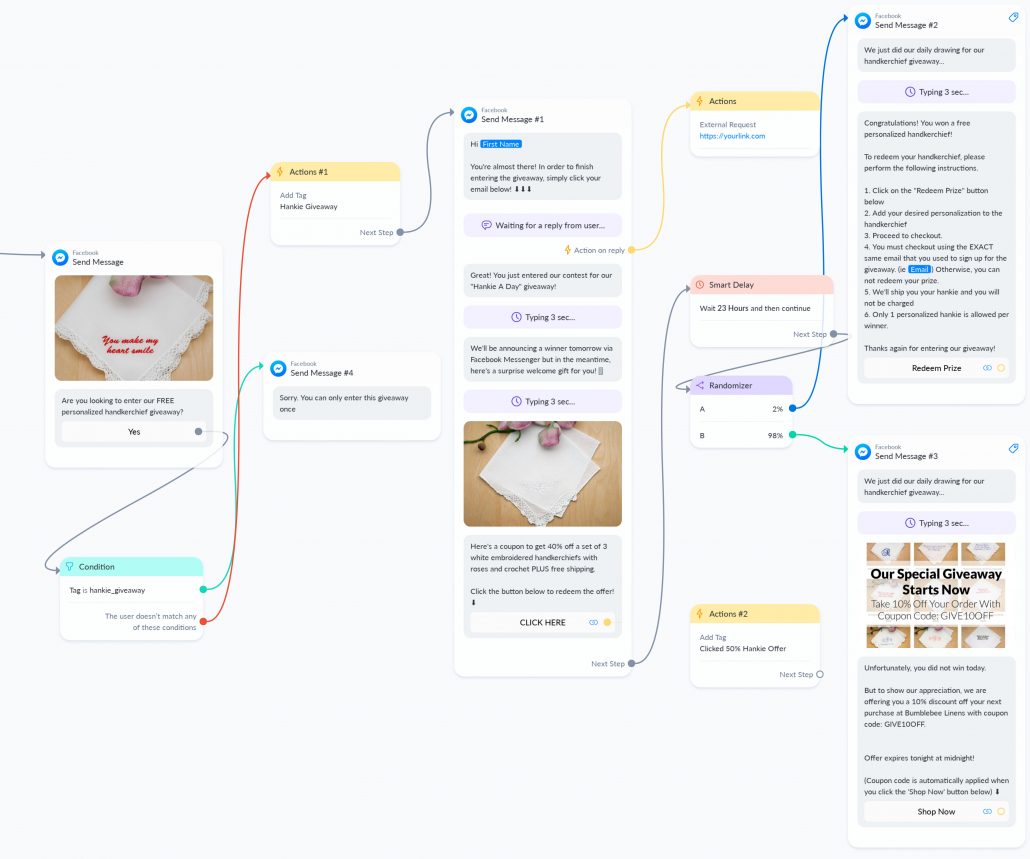
First off, I ask them if they want to enter my giveaway. If they click “yes”, they instantly become a Messenger subscriber.
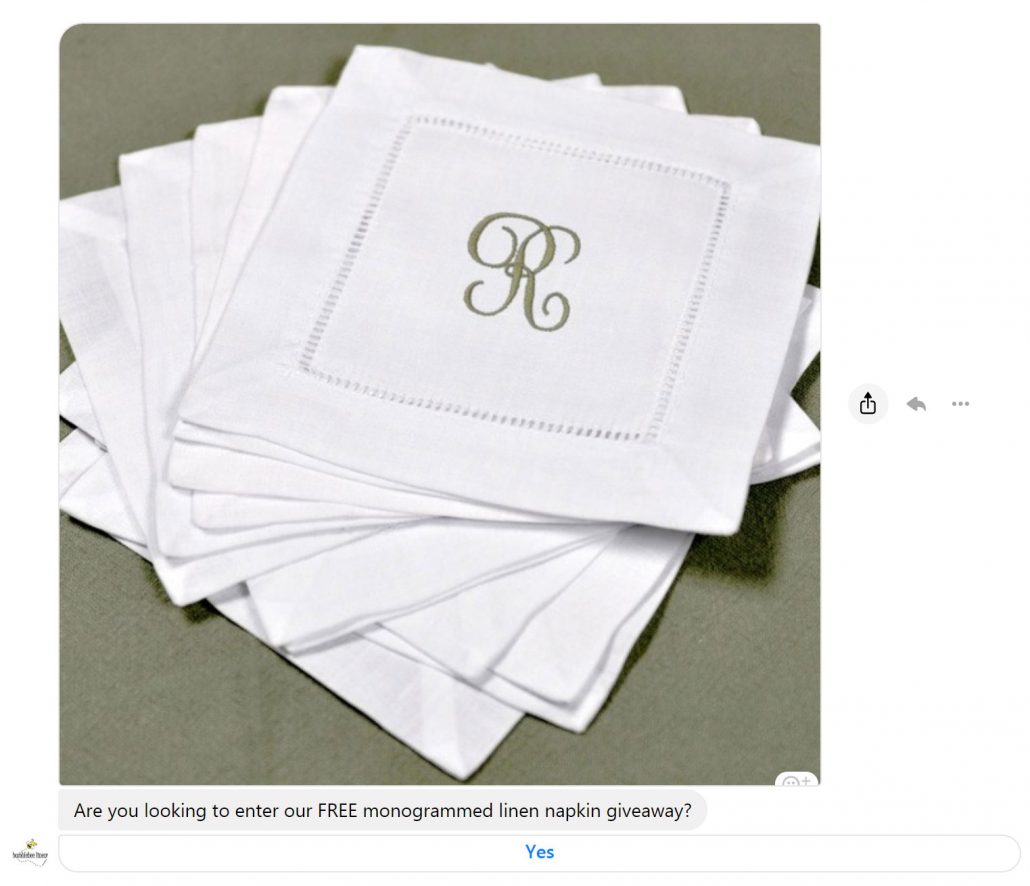
Step #2: Grab Their Email Address
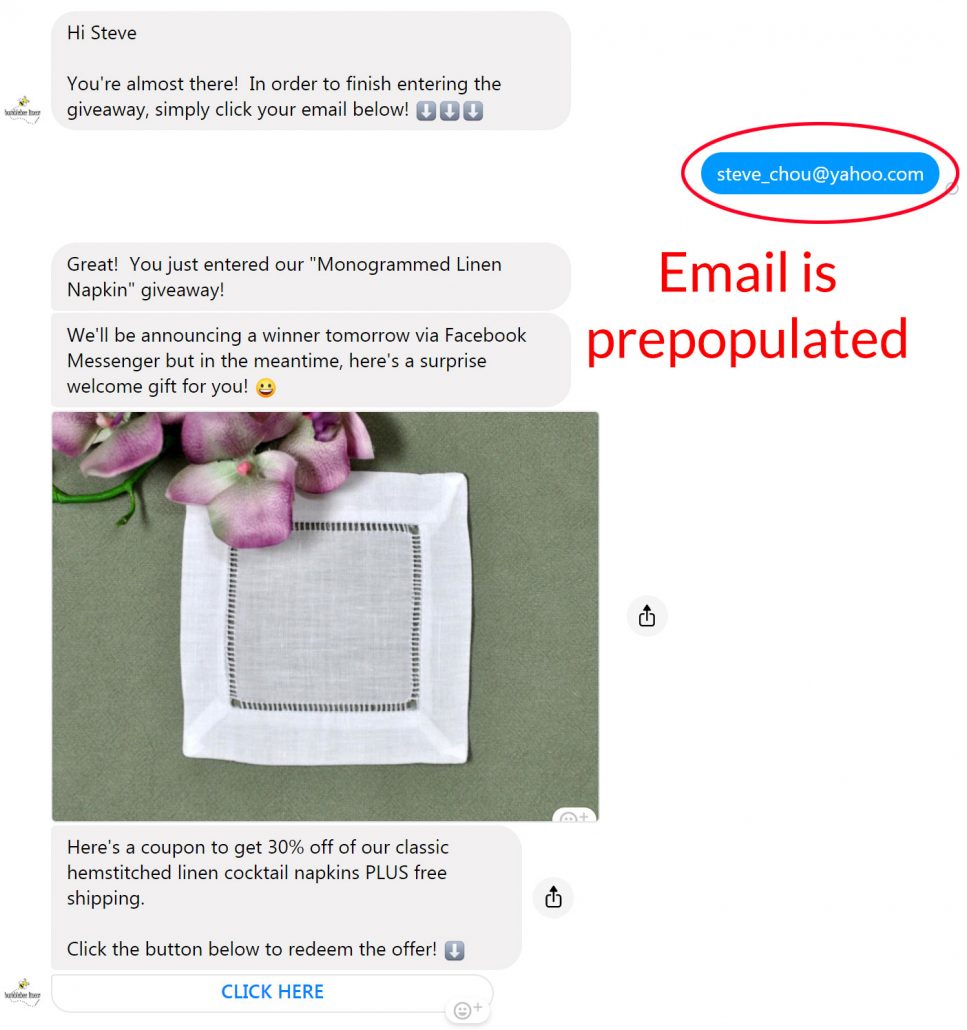
Then, I grab their email address. The beauty of using Facebook Messenger to gather emails is that your visitor’s email address is automatically populated with the email associated with their Facebook account.
All they have to do is tap on their email to enter.
Step #3: Pick Your Winner
You can use a randomizer to automatically pick your lucky winner directly from within your chatbot after 23 hours.
The winners get instructions on how to redeem their prize automatically from your website, while the losers get a special consolation coupon for your shop.
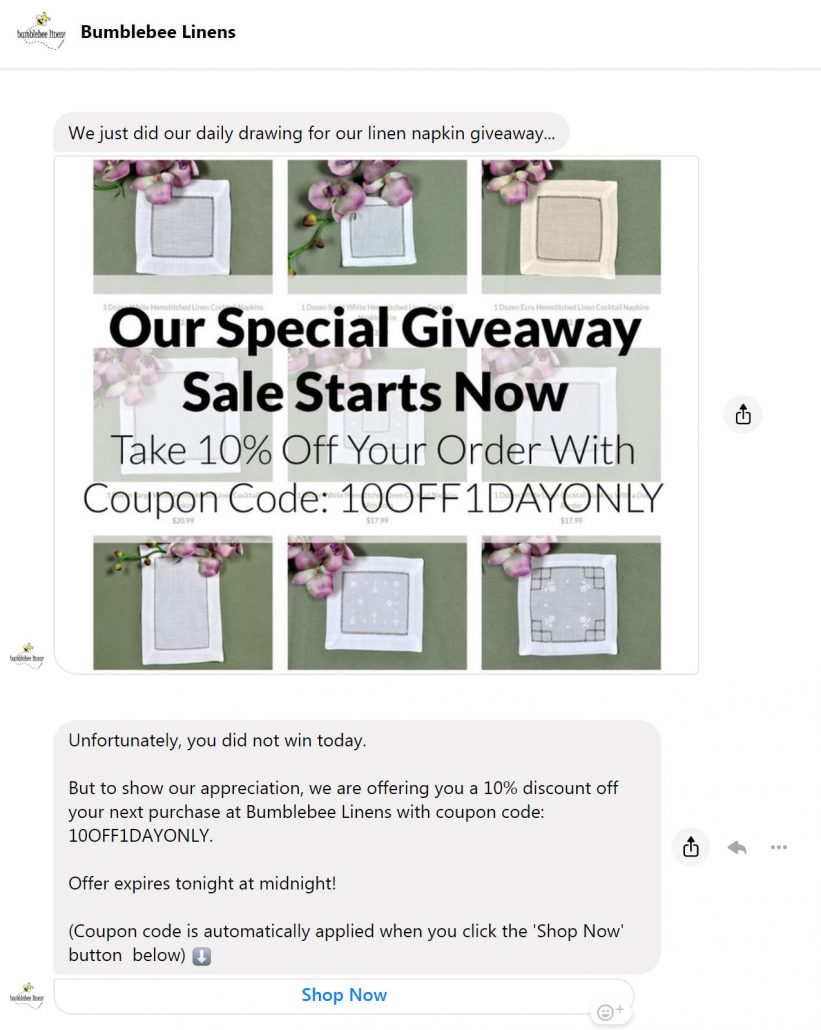
Overall, I like running Facebook Messenger giveaways over traditional giveaways because they can be started and stopped at any time and it basically runs on autopilot.
Method #2: Add A Live Chat Widget
When someone visits Bumblebee Linens, a live chat window pops up in the lower right corner of the homepage:
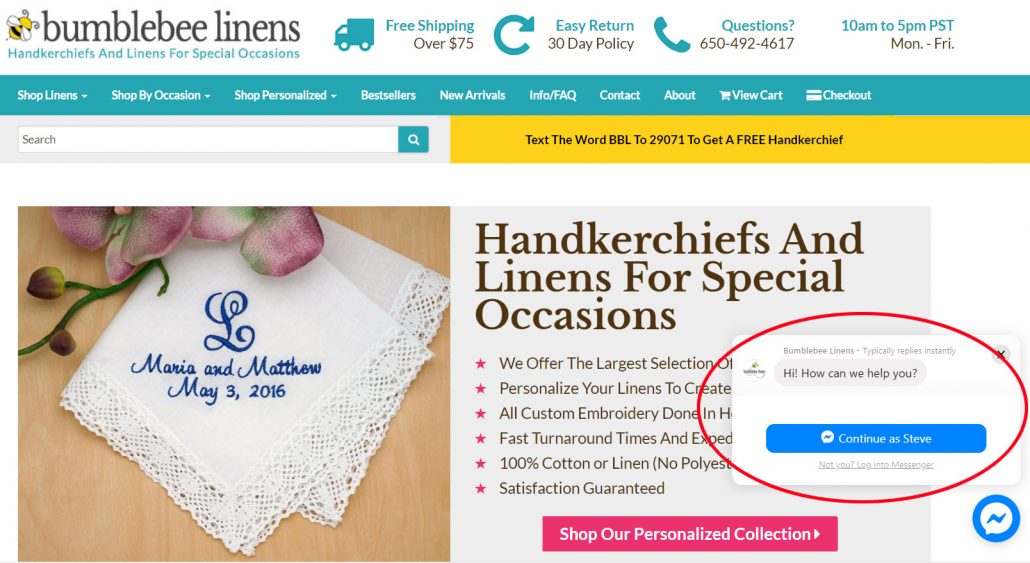
If the user goes on to click on the “Chat Now” button, they will see the following options:
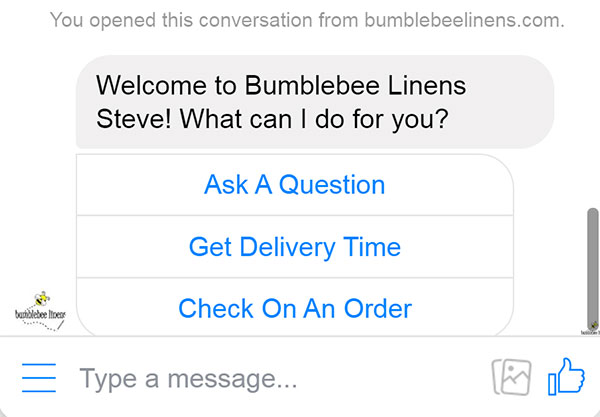
As soon as they click on any of the above buttons, they instantly become a Facebook Messenger subscriber.
If you don’t know where to begin to set up a Live Chat bot, try populating your options based on the most frequently asked customer support questions for your ecommerce store.
For example, “Get Delivery Time” and “Check On An Order” represent 70% of the inquiries I get on a daily basis.
Here’s what happens when a user responds to one of these calls to action:
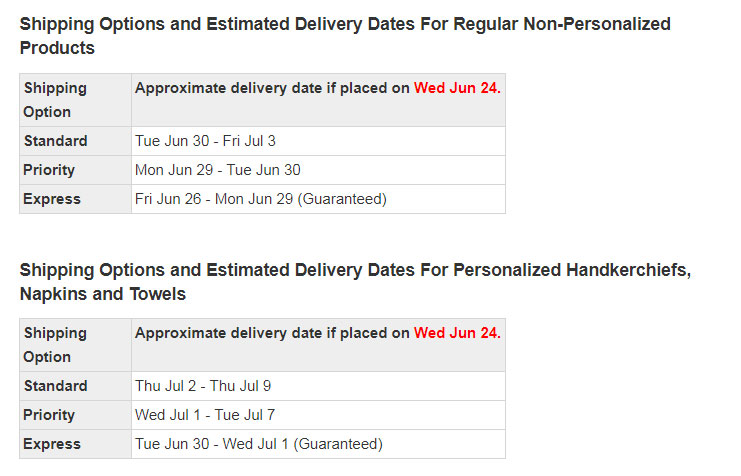
If they click on “Get Delivery Time”, they are taken to a page that tells them approximate delivery times depending on what they order
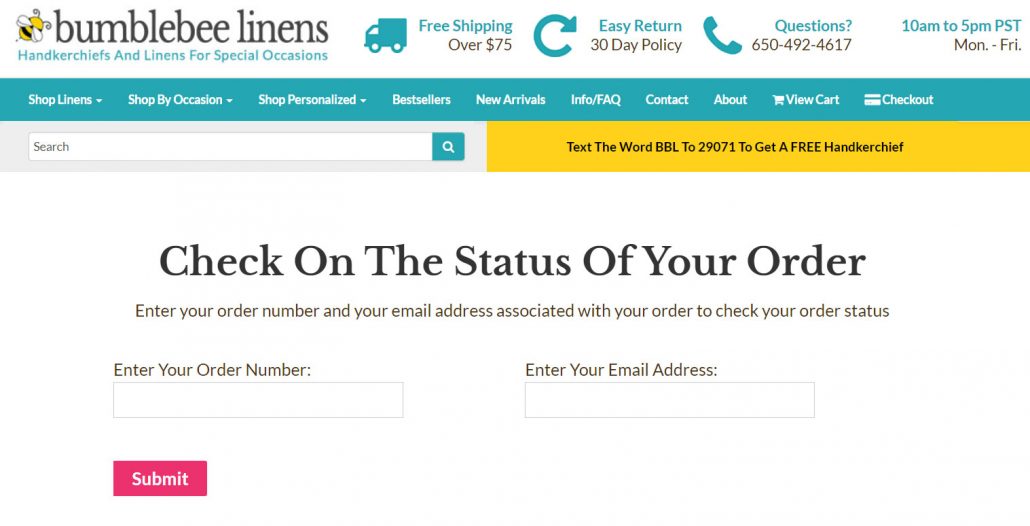
If they click on “Check On An Order”, they are taken to a page where they can get a detailed status on their order.
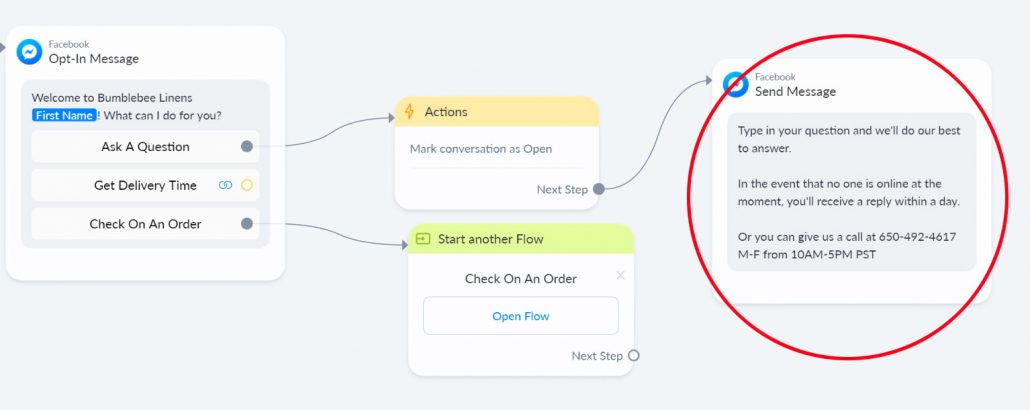
If they decide to “Ask A Question”, they are prompted to type out their inquiry or give my customer service team a call.
So far, the Live Chat widget on Bumblebee Linens has generated my business a steady stream of Facebook Messenger subscribers at no cost!
Method #3: Offer A Free Gift On Add To Cart
Another great way to grow your Facebook Messenger subscriber list is to offer a free gift with a checkbox opt-in to your Facebook Messenger bot.

In the above image, I’m offering a free gift if they check the box and click the “Add to Cart” button.
Note: I’m purposely mysterious about what the free gift is and many customers check this box out of curiosity.
This automatically opts them into Facebook Messenger and you can start sending them product and order specific messages!
Method #4: Run Facebook Ads
You can also run Facebook ads to build your Facebook Messenger subscriber list.
Here are some examples of ads that I’ve run for my shop.
This first ad below is a free plus shipping offer for top of funnel customers.
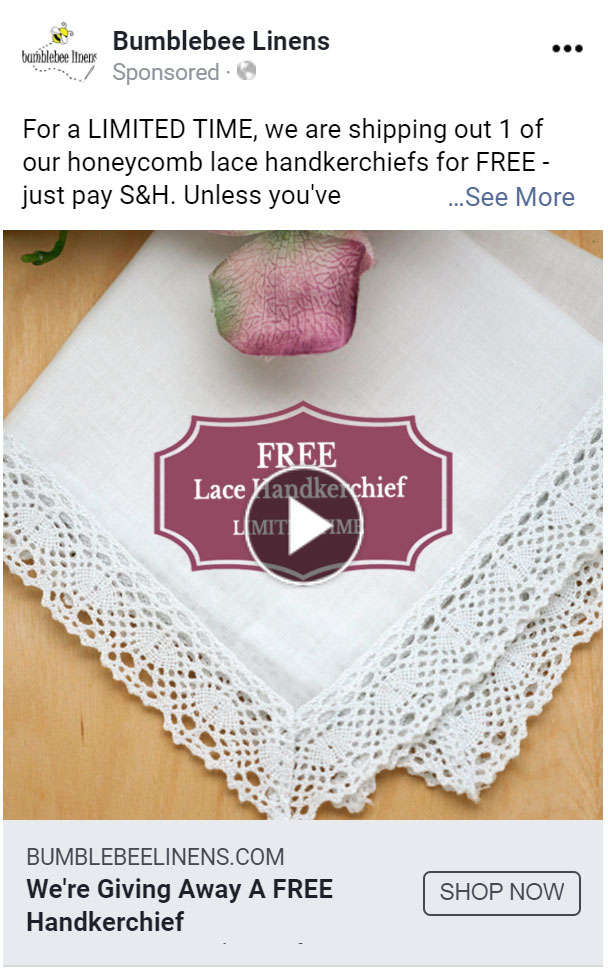
Whenever someone clicks on this ad, they receive the following Facebook message:
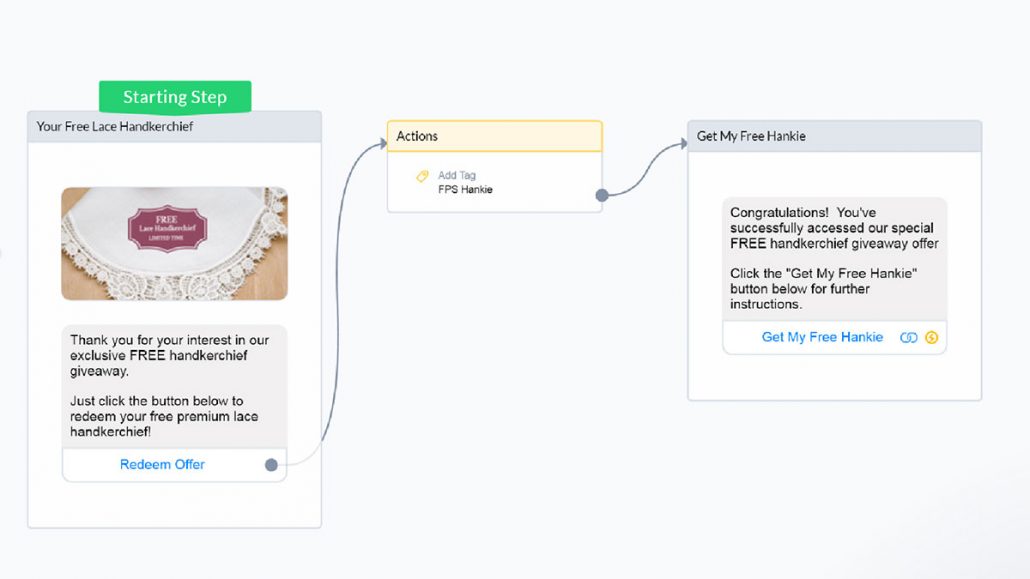
As soon as the customer clicks on any button, they immediately become a Facebook Messenger subscriber and are presented with an attractive offer in return.
In this case, after they click on the link, they are taken to a custom landing page where I ask them for their email to take advantage of the free hankie offer.
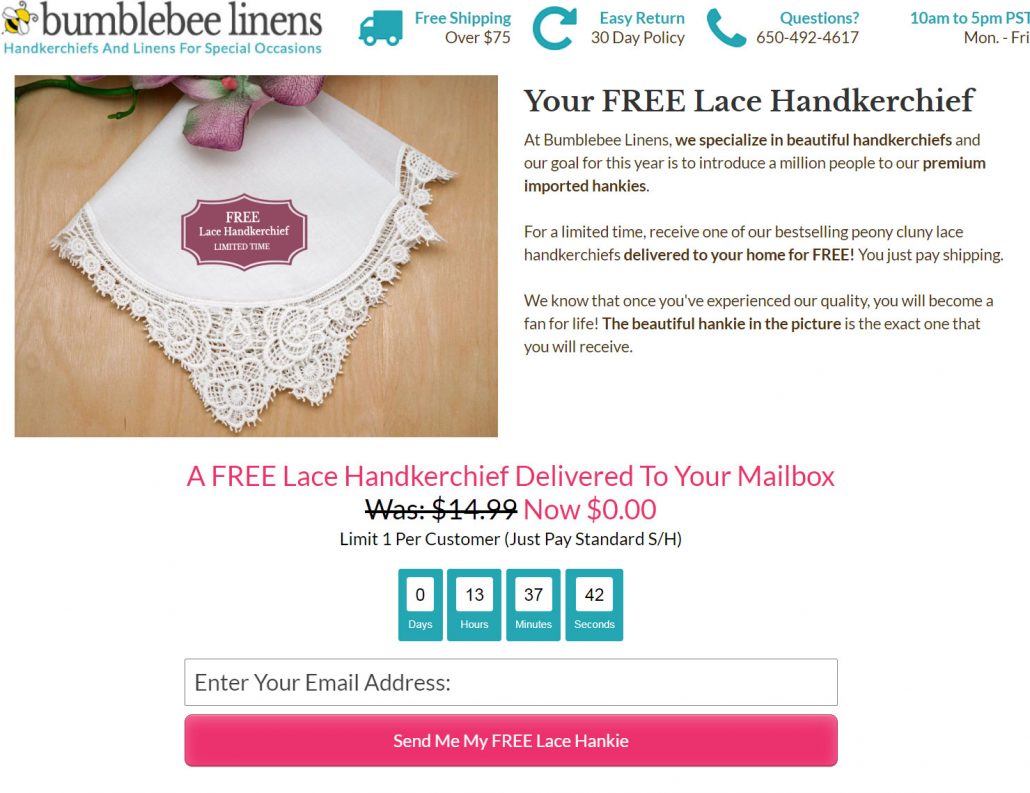
Running a free plus shipping offer this way is great because you can get a Facebook Messenger subscriber, gather an email address, pixel your visitor for retargeting and obtain a sale.
Method #5: Run Facebook Retargeting Ads
In addition to top of funnel ads, I also run Facebook Messenger retargeting ads to build my subscriber list.
Here’s an example of an ad I’m running to customers who have not purchased in the last 60 days.
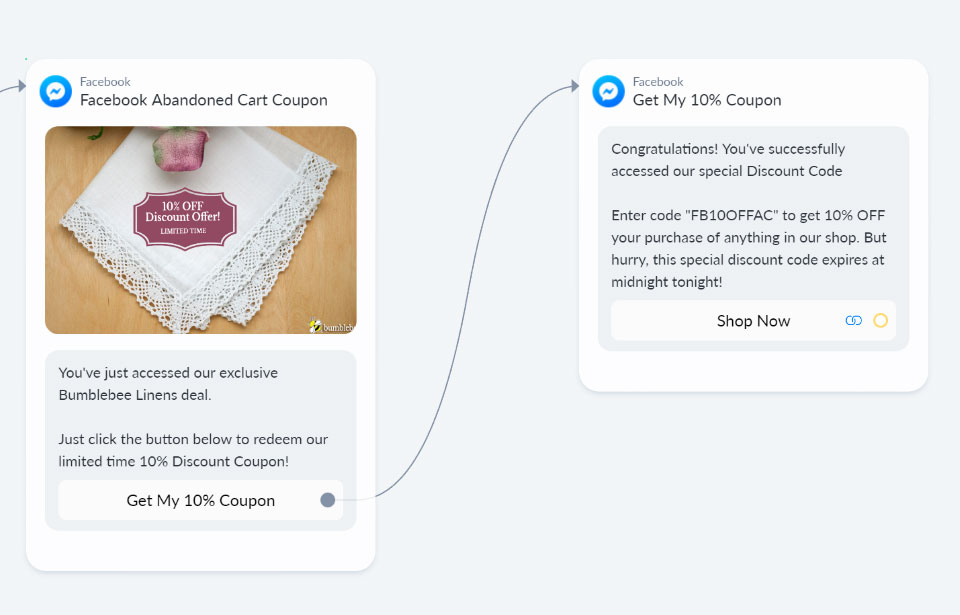
Instead of giving away the coupon directly in the ad, you can funnel your visitors through Facebook Messenger to gather a new subscriber in the process.
This way you can contact your customers in the future and automatically remind them to redeem the coupon..
Method #6: Create Facebook Live Videos
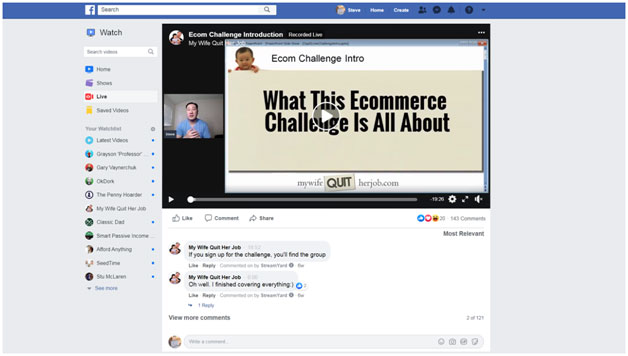
If you have a Facebook page for your ecommerce store, you can also gather subscribers whenever someone comments on a post on your page. This works especially well for Facebook Live videos.
While you are giving your live presentation, tell visitors to leave a comment in return for the slides or a special offer.
As soon as a user leaves a comment, they instantly receive a Facebook message and – bingo! – become a subscriber. It’s as simple as that.
However, be careful not to explicitly tell people to comment in the post itself as Facebook will likely reduce the reach of your post.
Method #7: Use A Spin To Win Popup
Customers love to play games. And I love to get their email and a Facebook Messenger subscriber at the same time.
To accomplish this, I created a special spin to win popup for my shop’s website where the customer must redeem their prize via Facebook Messenger.
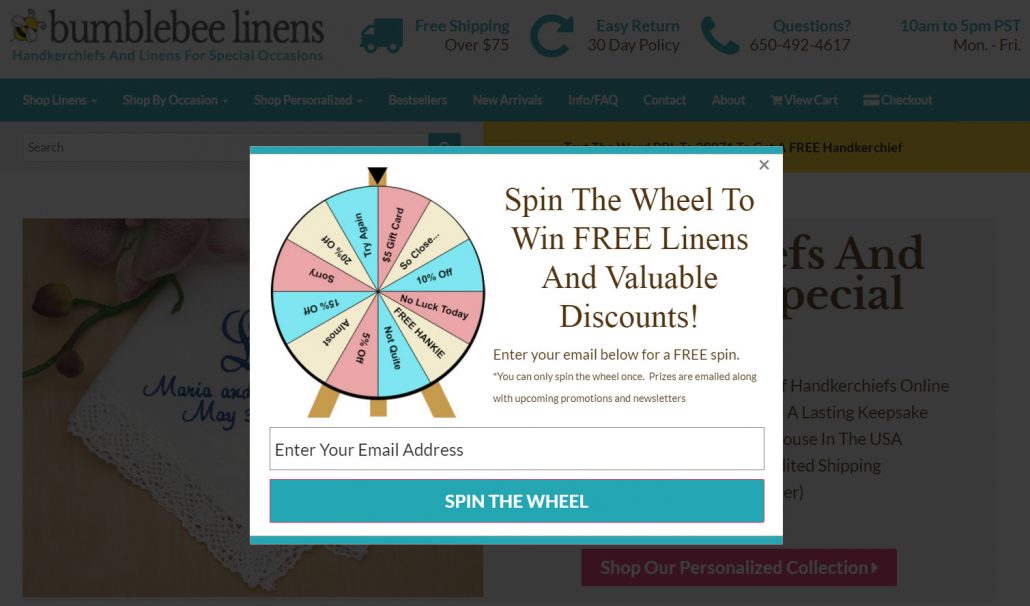
But the trick is that there are no losing spots on my Wheel of Fortune. In fact, there’s only a 50% chance of winning a coupon code and the conversion rate for this form is 2X higher than a typical coupon form.
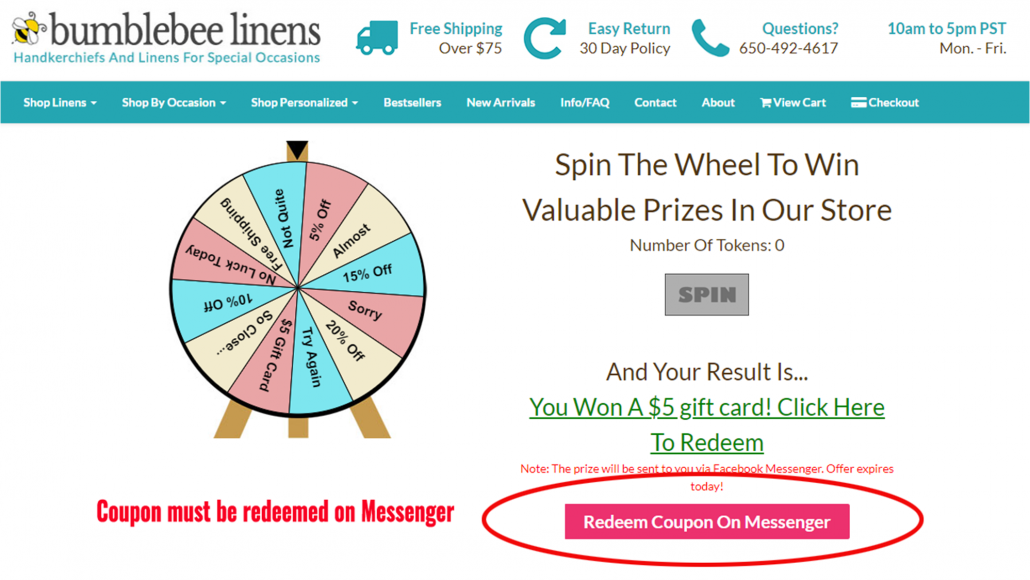
Here’s how you can set this up through a Facebook Messenger chatbot:
1. Implement a spin to win Wheel of Fortune popup on your site with a free tool like Privy
2. Ask your customer to leave their email so they can spin the wheel.
If they win, they must click on a link that takes them to your business’ Facebook Messenger chatbot to redeem their prize. In the example below, they need to click on “Yes” to redeem their coupon.
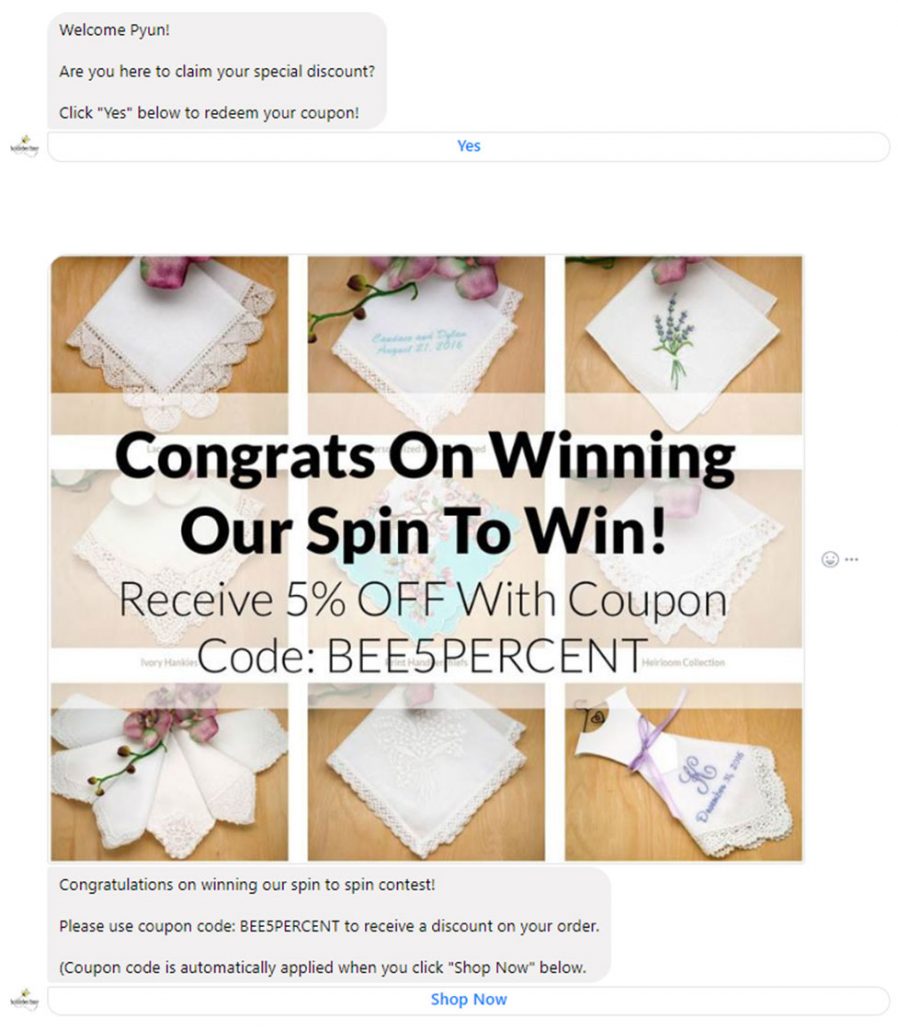
As soon as the customer clicks on “Yes”, they instantly become a Facebook Messenger subscriber.
After they see their coupon, they click on a button that takes them back to checkout with the coupon code automatically applied.
Just make sure you use the “Ref URL” growth tool in ManyChat or your favorite Facebook Messenger chatbot provider to create a separate bot for every prize on your wheel.
Wrapping It All Up
If you haven’t implemented a Facebook Messenger bot for your ecommerce business yet, then you should definitely start now.
The reality is that every customer prefers to interact with your brand in different ways. Some people like to read email. Others prefer Messenger.
But you can’t reach all of your customers unless you can communicate with them everywhere.
If you follow all of Facebook’s rules, Facebook Messenger marketing can be an excellent strategy to bring customers back to your shop for more sales!
Get started now while the platform is far from saturated and ads are still cheap!
The post How To Grow Your Ecommerce Store With Facebook Messenger Marketing appeared first on eCommerceFuel.

from eCommerceFuel https://ift.tt/3ik40sB
via
IFTTT

 from Ecommerce – Tamebay https://ift.tt/31zUk7b


