Showing posts with label Groove Commerce Blog. Show all posts

How To Improve Customer Experience: 5 Tips

How To Improve Customer Experience Blog


A customer's first impression — better yet, first experience — with a brand often makes or breaks their purchasing decision. Make a great first impression and create a positive experience for your customers by catering to their unique needs. In this blog, we're sharing 5 tips on how to improve customer experience and turn existing customers into repeat purchasers.

How To Improve Customer Experience: 5 Tips

Is your business at a standstill? Do you need some insight into how to improve customer experience? Try implementing these 5 tips to increase customer lifetime value and make your customers feel appreciated and valued.

  1. Understand who your customers are
  2. Connect with customers on a personal level
  3. Identify your customers' biggest pain points
  4. Reward loyal customers
  5. Ask for feedback

Understand Who Your Customers Are

Modern-day businesses will struggle to be successful if they don't understand who their customers are. Understanding your customers and your audience is at the core of inbound marketing, which is the ideology of attracting, engaging and delighting customers.

We recommend creating buyer personas to account for the various personalities of your audience. Conduct some research into who your current customers are and their intentions with your products/services.

In addition to looking at buyer profiles, which includes things like gender, age, income, geographical location, etc., generalize the intent behind a persona's purchase. Consider how a customer will use your product and how the product (or service) will benefit the customer.

This is just the beginning to creating a positive customer experience. Building this foundation with your customers will allow for later personalization and optimization of your marketing efforts.

Connect With Customers On A Personal Level

This one goes hand-in-hand with understanding who your customers are. Take it to the next level by segmenting your list so that you can later personalize content based on each contact's preferences.

Segment by lifecycle stage, previous purchase behavior and more. From there, tailor individual shopping experiences to help accelerate the consumer purchase decision process or nurture them post-purchase.

For example, if a customer recently purchased a camera from your store, personalize their experience with your brand by following-up with an email featuring SD cards, batteries, lenses or anything else related to the product. People love to feel special and tend to be more loyal to a brand when it seems that a brand cares about them as an individual.

Identify Your Customers' Biggest Pain Points

How can businesses solve their customers needs if they don't understand their customers biggest pain points? To put it simply, they can't. We strongly recommend following up with customers post-purchase to see if your products/services met or exceeded their needs.

Also, dedicate time to see how your customers are talking about your brand on social media. People tend to be brutally honest and don't hold back on sharing their opinions with their network. This can be a true learning experience for any business, and it's a great way to see what your customers care about the most.

Reward Loyal Customers

We've mentioned before that it costs about 5 times more to gain new customers than it does to retain existing ones, and a study from Adobe found that loyal customers generate 3 to 7 times more revenue per visit. Take advantage of this opportunity to save big and earn more by nurturing and rewarding your current customers.

If you were to ask us how to improve the customer experience, we'd say that rewarding loyal customers is one of the most important things brands can do. Increase customer retention by implementing a customer loyalty program software that rewards your most loyal customers for their purchases.

Customers love gaining rewards with each purchase, and it inspires them to come back to your store again. Improve the customer experience by offering incentives, like discounts or free items, to your most valued customers.

We encourage you to leverage a tool that is multi-faceted, like Smile.io. With features like a points program, tiered VIP program and referral program, Smile.io makes it easy for businesses to reward existing customers, increase customer lifetime value and turn returning customers into brand evangelists.

Ask For Feedback

If you're really unsure on how to improve customer experience, try asking your customers directly! Don't be afraid to ask customers to write a review or fill out a survey on how their experience was. Any feedback is good feedback (even if it's negative) because it will help your business improve in the future.

We encourage eCommerce stores to showcase customer reviews — especially on product pages — to assist other shoppers in their purchasing decisions. When consumers see that their peers love an item, they'll be more inclined to purchase it.

Another great outlet for gathering customer feedback, other than reviews, is through social media. Create a poll on your Instagram story, and ask your followers to fill out the poll or answer your questions. Incentivize them to respond honestly by entering them into a giveaway for completing all questions.

Conclusion

By now, we hope you have a better understanding of how to improve customer experience. If you have any questions or need help optimizing your eCommerce marketing strategy to better meet your customers' needs, don't hesitate to reach out. Just fill out the form below with any questions or concerns, and a member of our team will be happy to help!



from Groove Commerce Blog https://ift.tt/2ItxLcX
via IFTTT

Website Design Before & After: Transitioning To BigCommerce

B2B eCommerce businesses require a platform that allows for a positive user experience, taking into consideration factors like fast site speed and mobile optimization. When this client turned to Groove to switch platforms, we were happy to help.

Continue reading this case study to see the website design before & after for our client, Curtain Call, and how we updated their eCommerce store to improve the customer experience.

Website Design Before & After Working With Groove

Curtain Call is a B2B eCommerce store that sells dance class wear and costumes for recitals. Before working with our team, Perform Group, the parent company to Curtain Call, hosted the site on Magento. They often ran into site speed and page load time issues due to their outdated website, so they enlisted the help of Groove Commerce to migrate platforms and enhance the overall website design.

The Challenge

Outdated Website Design

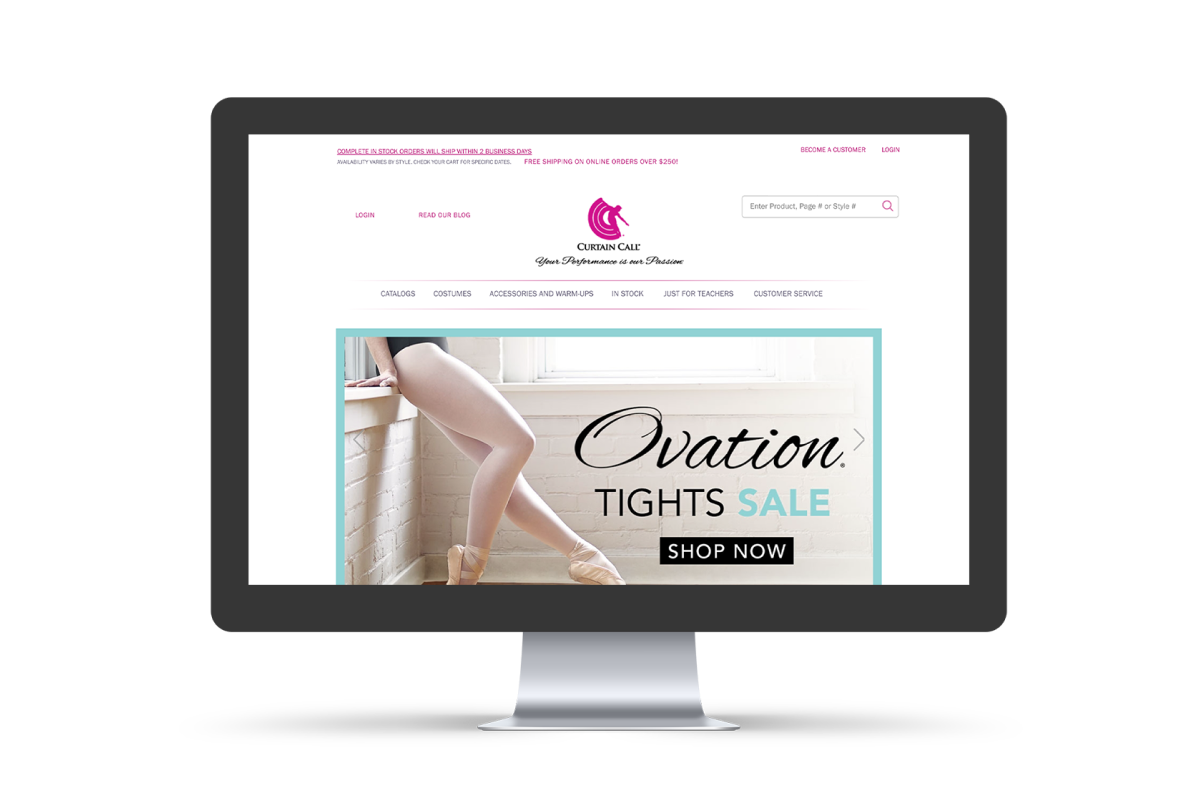
Curtain Call's website design was outdated before working Groove, and the outdated design made it difficult for them to regularly update the site. They had a strong catalog focus and wanted to be more online-oriented, so optimizing their eCommerce store was a must to ensure that the site could be flexible enough for their team to update it when needed.

Here's what the Curtain Call home page looked like before working with our team:

Curtain Call Old Website

Website Was Not Optimized For Mobile

Optimizing eCommerce stores for mobile is key to increasing the customer experience. Curtain Call's original website didn't provide a positive user experience on mobile. It was difficult to navigate and didn't load as fast as their competitors' sites.

The Solution

To help Curtain Call migrate eCommerce platforms, we took their team through an extensive BigCommerce review that helped us determine the best solution for them. We seamlessly migrated their Magento store to BigCommerce, and now their store is optimized with their customers in mind.

Custom Design

The Curtain Call team regularly updates their banners independently, so we knew that we needed to build a custom design that is flexible enough for their team to make these changes on their own.

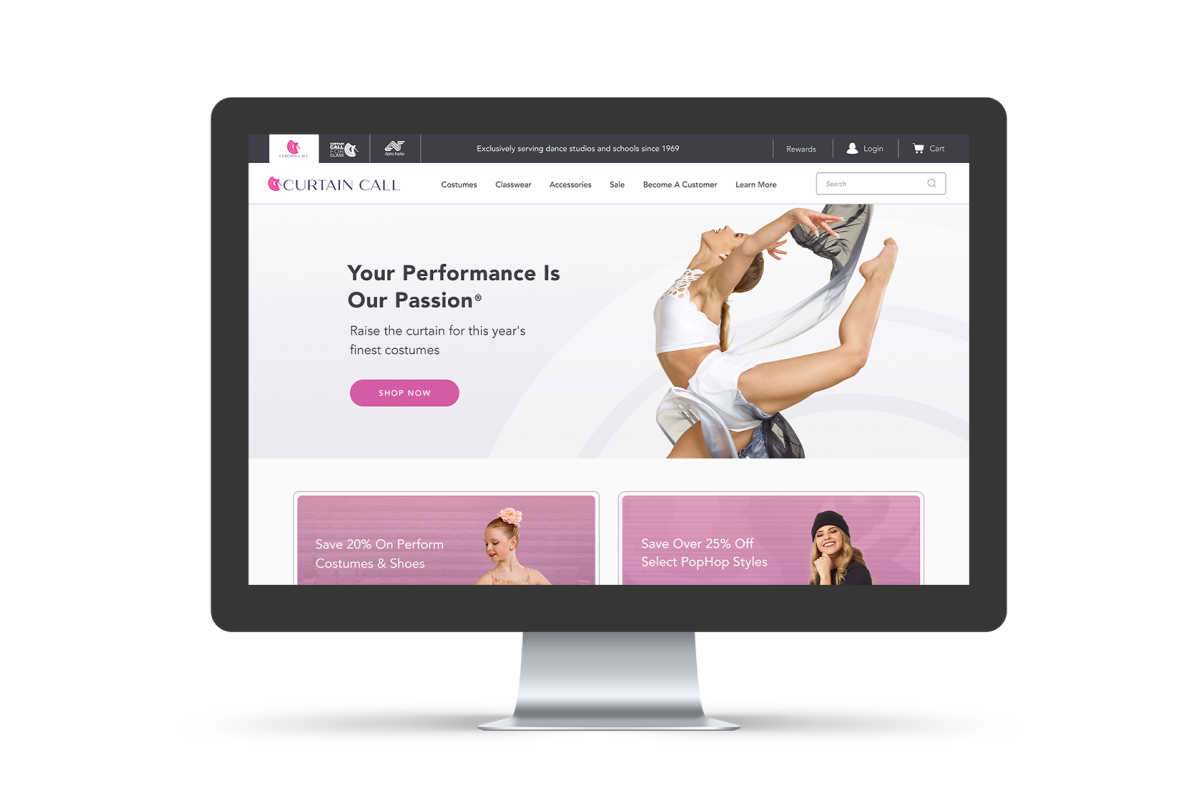
In other words, rather than building their current website design, our team built the framework for it so that the Curtain Call team can update the design on their own. This gives their team the ability to add more things and make changes to their site independently.

Here's what Curtain Call's home page looks like now:

Curtain Call's Home Page After Working With Groove Commerce

Optimize The Website For Mobile

Curtain Call recognized an important advantage of transitioning to BigCommerce: the SaaS platform is designed to support large eCommerce orders. Because thy sell to businesses, their customers accumulate extremely large shopping carts over time, which contributed to slower page load times when the site was run on Magento.

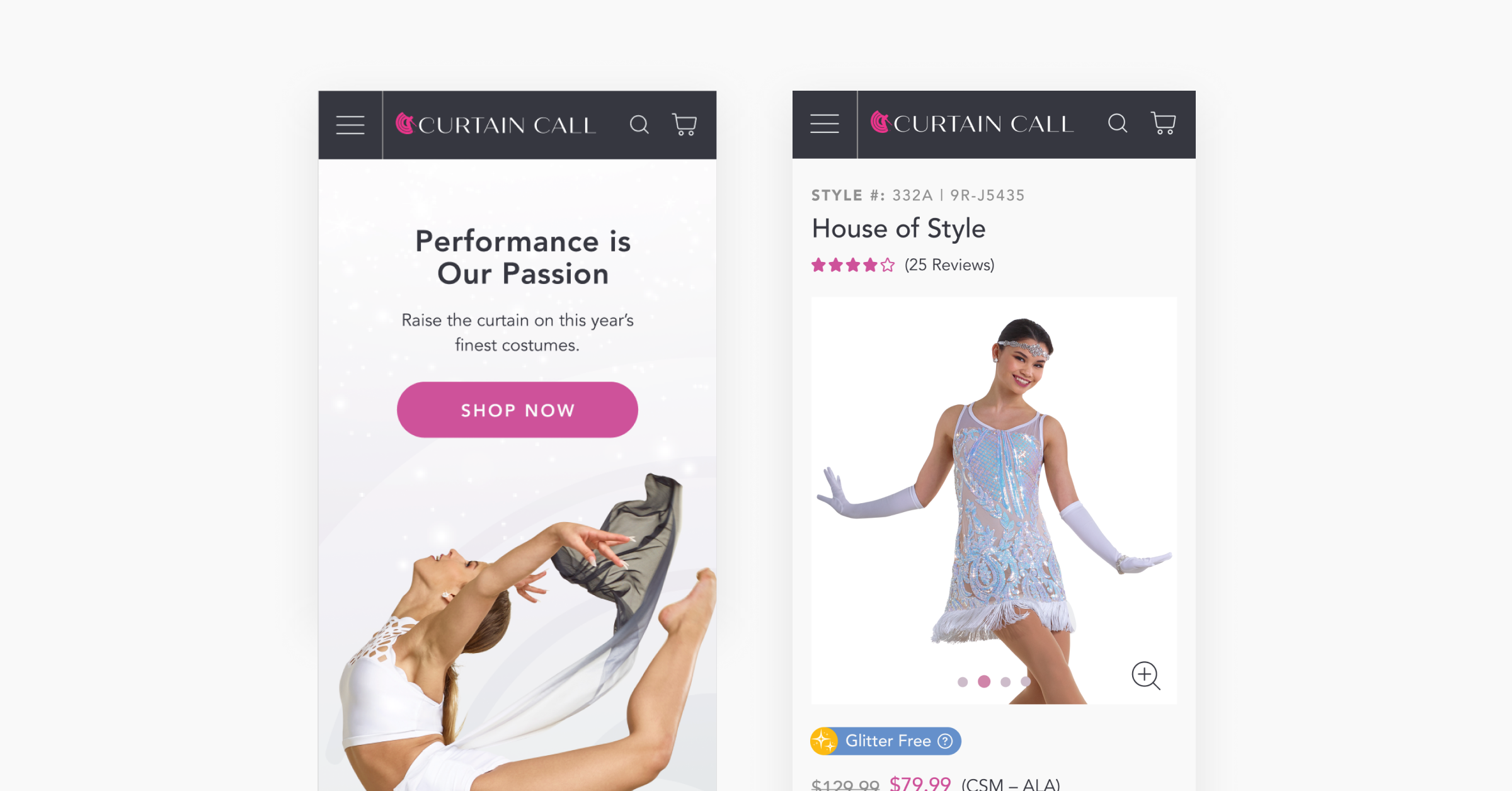
So, we optimized the Curtain Call website to cater to the shoppers who browse and check out on mobile. Now, it takes much less time for web pages to load on mobile, and shoppers have an easier time finding what they're looking for.

Here's what the site now looks like on mobile:

Curtain Call's Mobile eCommerce Design

User Testing On Product Detail Pages & Bulk Ordering

We created a bulk order form on product detail pages, which allows buyers to order products in large quantities. From there, we conducted user testing to see which product page design offers the most seamless user experience.

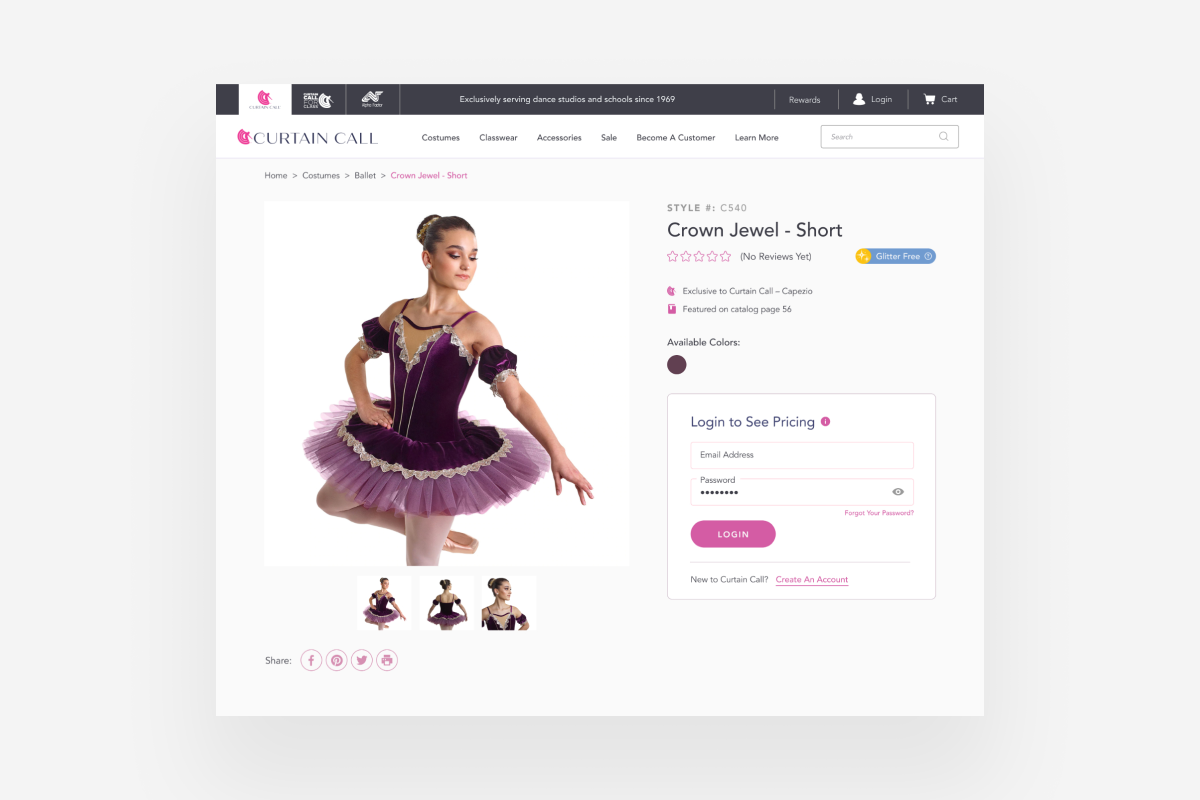
Also, Curtain Call's product detail pages now show the number of items left in stock for a given product at any given time − something they struggled with on Magento. We used the IBM iSeries integration to display accurate inventory amounts and expected delivery dates on product pages to ensure a positive customer experience.

The screenshot below shows one of their updated product detail pages. It's important to note that since Curtain Call sells B2B, customers must make an account and login to see the prices of their products.

Curtain Call Product Detail Page

Testimonial

“Working with the team at Groove Commerce allowed us to improve our eCommerce experience and promote our products in fresh, exciting ways. We were able to add new features to our store, which allows us to deliver better service to our online audience.”

- Emily Fritz, Perform Group LLC

Conclusion

The Groove Commerce team launched Curtain Call's BigCommerce store at the end of September, and we are anticipating an increase in online sales due to the improvements in user experience and website design.

If you have any questions about migrating eCommerce platforms or are wondering how Groove Commerce's website and marketing services can transform your online store to offer better shopping experiences, contact us through the form below. We can't wait to learn how we can help your business grow!


from Groove Commerce Blog https://ift.tt/3eLBA9u
via IFTTT

eCommerce Design Trends To Expect In 2021

eCommerce Design Trends 2021


Many businesses had to transition from brick-and-mortar to eCommerce in 2020. Given the circumstances, brands that are newer to selling online had to make significant adjustments.

Similar to businesses, consumers were forced to adjust their shopping habits in 2020. With a decrease in physical in-store shopping and an increase in online shopping, consumer shopping habits are bound to look different in 2021.

The eCommerce design trends that we share in this blog are to help online stores implement tactical strategies that will create a positive user experience and convert more visitors into customers.

eCommerce Design Trends To Look Out For

In this blog, we're sharing eCommerce design trends to keep an eye out for in 2021. Heads up − this is not a comprehensive list, and what may work well for one business does not necessarily mean it will work well for another.

That being said, consider the website design principles that your business prioritizes, and strategize to see if/how any of these eCommerce design trends are congruent with your strategy:

  1. Dynamic product images
  2. Dark mode
  3. Advanced chatbots
  4. Interactive shopping experiences
  5. Combining photographs with graphics

Dynamic Product Images

Though high-quality product photography is appreciated by shoppers, today's consumers like to see products in action before making a purchasing decision. Try utilizing videos or moving images, like GIFs and animations, to fully portray all aspects of a product.

Dynamic product images are great to use on a website's home page, landing pages and product pages. Don't be afraid to test it out; it could increase your product page conversion. Just avoid using them too frequently throughout landing pages, so you don't overwhelm your visitors.

Dark Mode

Dark Mode enables users to view their smartphones and apps with darker colors to help alleviate eye strain. Google launched it in 2019, and other social media platforms have implemented it, too.

Typically, dark mode turns on automatically at night, when the device recognizes the lack of light in the room. However, iPhone users can turn dark mode on when they want − and leave it on throughout the day, too.

Some eCommerce store owners don't like what their websites look like in dark mode; however, it's nearly impossible to control how your audience prefers to view content.

Google Chrome transitions to dark mode automatically, and it's critical to optimize your eCommerce design to ensure that your website looks aesthetically pleasing in dark mode.

Advanced Chatbots

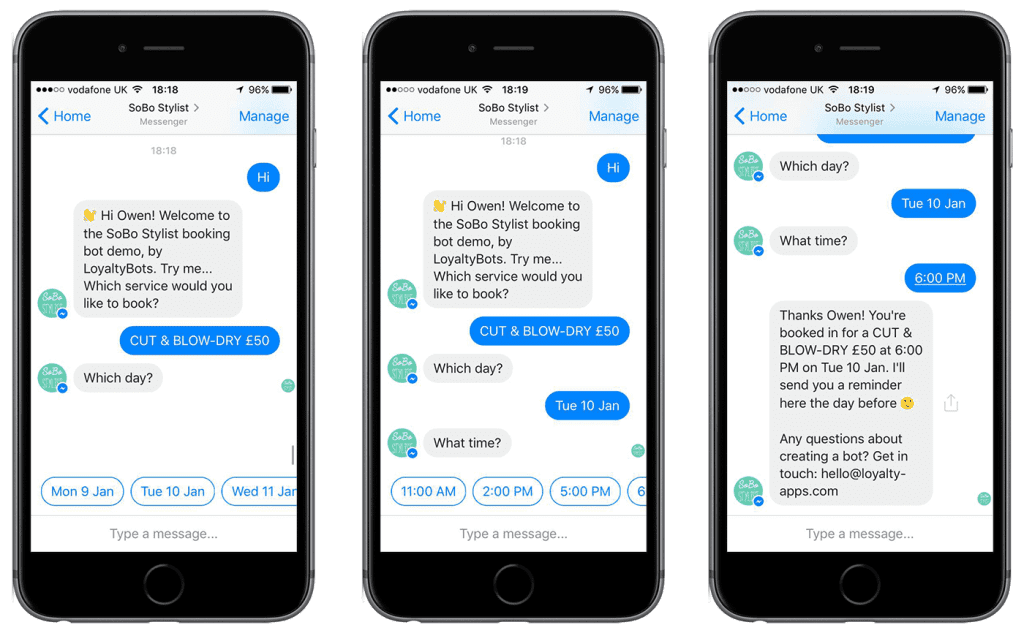
Artificial Intelligence (AI) isn't new to 2021, and chatbots aren't new to eCommerce. However, chatbots have become so advanced that they can actually help guide shoppers through the buyer's journey. Don't believe me? Check out the picture below.

eCommerce Design Trends: Advanced Chatbots

This chatbot helps a customer book an appointment for a unique service at their preferred date and time. Take it a step further and personalize a user's experience with a chatbot based on specific actions. However, don't overwhelm your audience by sending irrelevant messages or too many messages at a time.

Interactive Shopping Experience

When shopping online, customers can't try on product like they can in a store. Fulfill customers' desires to see what an item will look like on them by leveraging virtual or augmented reality.

Much like Snapchat offers interactive ads with augmented reality, your eCommerce website can do the same. Use this functionality on product pages, so shoppers can have clearer expectations and a better understanding of your product.

Combining Photographs With Graphics

Combining photographs with graphics or overlapping one on top of the other is something we expect to see more of in 2021. Of all the eCommerce design trends discussed, this strategy shows a brand's creative side.

It's a great design strategy for all eCommerce verticals. Whether a business wants to express its brand personality or convey a sense of seriousness, these graphic elements are totally customizable and can enhance your design. Canva is a great tool get you started with creating unique images and graphics.

Conclusion

We hope these eCommerce design trends help you plan out your website strategy for 2021. If you have any questions, don't hesitate to fill out the form below to get in touch with a member of our team. We'll be happy to talk with you to see if Groove Commerce is a good fit for your business!

Want to learn more about how our team can help? Check out how we helped this client improve the overall eCommerce user experience with an optimized website design.


from Groove Commerce Blog https://ift.tt/3l13PmJ
via IFTTT

How KegWorks Enhanced Their Website Design With BigCommerce

When the KegWorks team became frustrated with the costs and poor functionality of Magento 1, they turned to Groove Commerce for help migrating eCommerce platforms. Their migration decision has helped position KegWorks for growth, and the recently launched BigCommerce website design has improved the overall user experience.

Launching KegWorks' BigCommerce Website Design

KegWorks is more than just a B2B and D2C eCommerce website − they're more like your favorite drinking buddy who has the coolest home bar on the block. From keg tapping equipment to drink ware, bar accessories and flavored ingredients, KegWorks has everything cocktail connoisseurs and bar owners alike need to craft the best alcoholic (and non-alcoholic!) beverage.

The Challenge With Magento 1

Technical Overhead

The KegWorks website was originally hosted on Magento 1, which presented a great amount of technical overhead. To make sure their site was running properly, KegWorks had to do much of the manual work themselves, like maintain their own servers. And, they dealt with ongoing hosting and maintenance fees that weren't worth the price.

So, the company evaluated other SaaS eCommerce platforms to help alleviate some of that technical debt, increase site speed and enhance their technology stack. They evaluated BigCommerce vs Magento and quickly realized that BigCommerce was the missing puzzle piece they needed to meet their eCommerce goals.

KegWorks Before

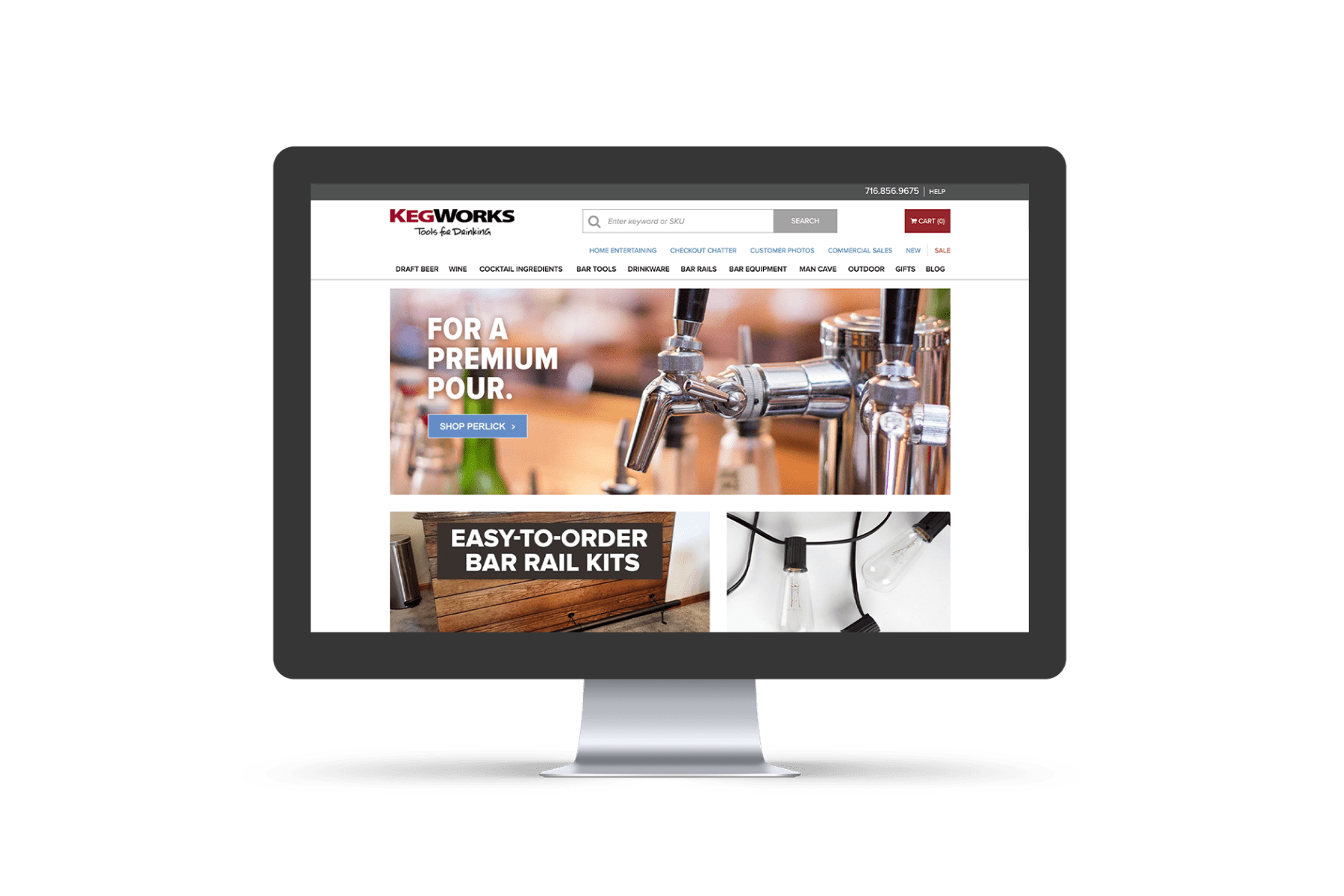
Below is what KegWorks' Magento 1 website looked like prior to enlisting Groove's help. From a navigation perspective, there were too many categories and subcategories to browse through, so their goal was to organize the navigation and condense the categories.

KegWorks Website Before Working With Groove Commerce

KegWorks After

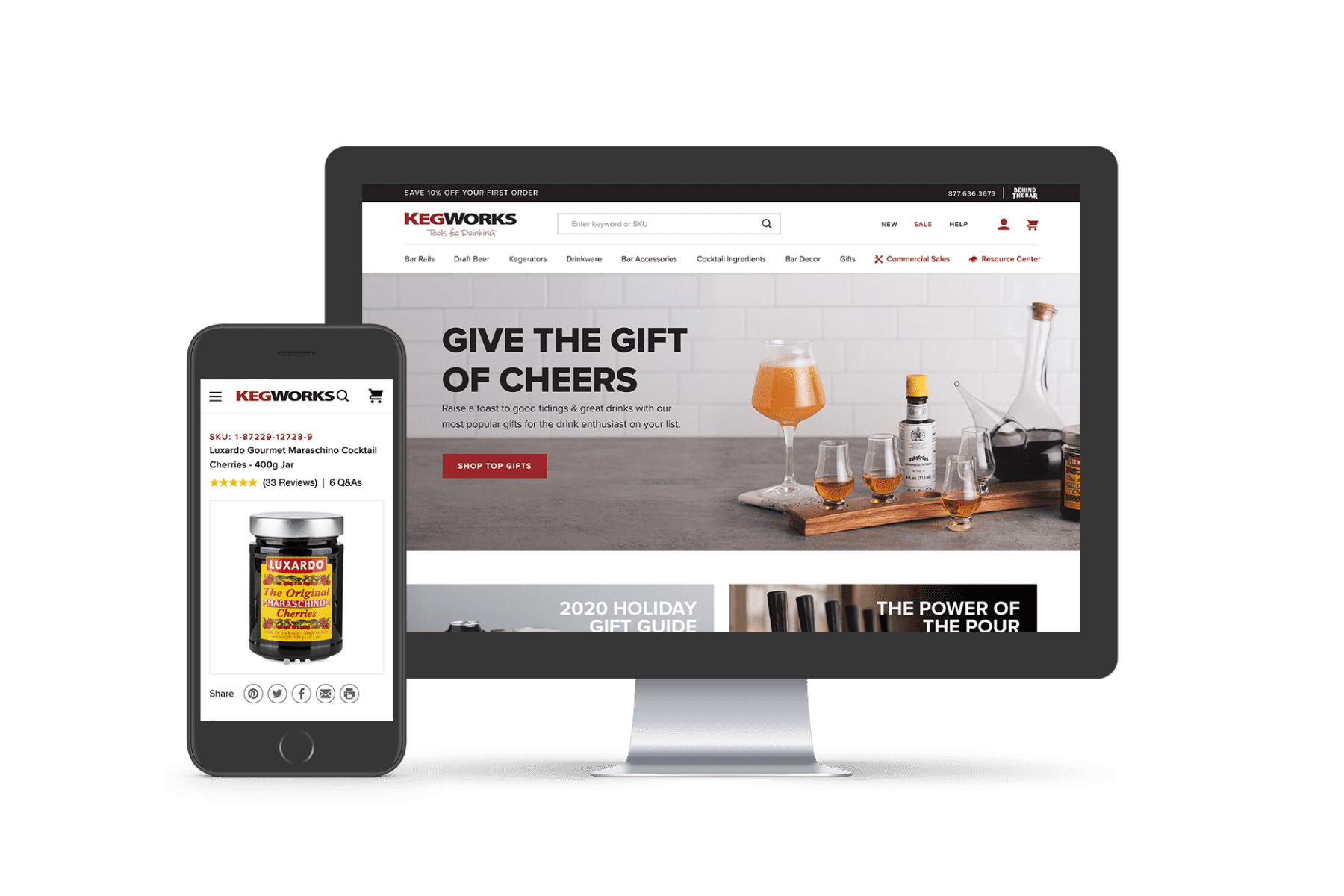
Here's what the site looks like now. We enhanced their BigCommerce website design to improve the overall on-site experience. Navigation is now seamless, and the dozens of categories and subcategories are organized neatly and efficiently.

KegWorks Website After Working With Groove Commerce

The Solution

Migrate To A SaaS Platform

KegWorks was straightforward in that they knew they wanted to move to a SaaS-based platform. Using our team's expertise, we guided them, took them through an extensive BigCommerce review and showed them the value in choosing a platform that was best for their eCommerce needs.

Build An Organized BigCommerce Website Design

With the help of our team, KegWorks' site is now organized and easy to navigate. Whether you're a contractor looking for bar rails or a beer connoisseur looking to purchase home-brew kegging equipment, KegWorks' latest BigCommerce site is designed with your needs in mind.

We also collaborated with Reflektion, an AI-driven personalization platform, and BigCommerce to offer on-site search functionality. Not only does this help those who visit the KegWorks site find what they're looking for, it also helps KegWorks convert high-intent customers.

Integrate BigCommerce & HubSpot

In addition to leveraging a BigCommerce website design, we took advantage of HubSpot's functionality and analytical capabilities. For one thing, we used the HubSpot BigCommerce Integration that our developers created to help KegWorks capture abandoned carts and follow-up with customers after they've made a purchase.

We also helped the company leverage HubSpot's advanced dashboard and reporting tools, so they can streamline their own marketing efforts and further cater to their customers' needs based on past purchasing behavior, interests and more.

Prepare For Future Growth

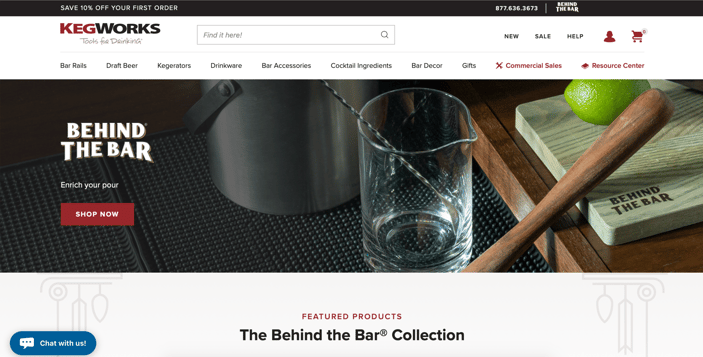
KegWorks has what we like to call a sub-brand, called "Behind The Bar," which falls under the KegWorks umbrella and offers high-end equipment that is meant to be used literally behind the bar. From a glass soda siphon to an hourglass cocktail muddler, Behind The Bar sells fine bar tools that cater to professional bartenders and cocktail hobbyists alike.

KegWorks' Sub Brand: Behind The Bar

Transitioning to BigCommerce has allowed KegWorks the ability to grow their brand − a perk that doesn't come with Magento. BigCommerce has also helped KegWorks overcome the challenge of growing their eCommerce store with other features and functionality, and it gives them the peace of mind that their other sub-brands can be hosted on the same site.

Conclusion

We're expecting KegWorks to see some serious results with this updated BigCommerce website design. In the first 30 days after launching their site, compared to year-over-year, they've seen transactions increase by over 35% and eCommerce conversion rate increase by over 48%.

If you're looking to increase website performance with BigCommerce or migrate to a new eCommerce platform, our team is here to help. Just fill out the form below with any questions or concerns, and a member of our team will be in touch soon. We look forward to helping you build, design and grow your online store!


from Groove Commerce Blog https://ift.tt/365wS2n
via IFTTT

Inbound Marketing Strategy: 6 Ways To Attract More Visitors

Jaime - Inbound Marketing Blog


Inbound marketing is the concept of earning the attention of your audience through the development of unique content − like blogs, videos, newsletters, SEO, social media and more.

Creating high-quality content is hard work, and ensuring that your content ranks on search engine results pages is even more difficult. Since there's no single magic formula to ranking #1 on Google or creating content that your audience loves, we're sharing some strategies to attract more visitors and improve your overall inbound marketing strategy.

Inbound Marketing Strategy: 6 Ways Drive More Site Traffic

Enhancing your eCommerce inbound marketing strategy is important when it comes to attracting, engaging and delighting customers. We've outlined 3 SEO tips to help your website rank on search engines and 3 content-related tips to help your brand engage more customers.

  1. Optimize URLs
  2. Use header tags
  3. Include keywords in alt text
  4. Create a blogging calendar
  5. Have a strong social media presence
  6. Leverage eCommerce advertising

SEO Tips

Optimize URLs

URLs aren't just the unique location of a web page on the internet. In fact, search engines like Google take URLs into consideration when deciding on the ranking of a web page. So, if you want your web page to rank high organically, try optimizing your URLs.

Here's what you can do:

  • Keep URLs readable
  • Use hyphens instead of underscores
  • Include targeted keywords in URLs
  • Avoid capital letters

If a web page does not exist anymore and a person lands on that page, it will present a 404 error. Correct this by implementing a 301 redirect. This type of redirect tells search engines that the original URL is now linking to a different page.

Avoid redirect chains at all costs. Redirect chains occur when URL #1 links to URL #2, which then links to URL #3. To resolve redirect chains, edit your links so that URL #1 links directly to URL #3.

To learn more about URL structure, check out this Complete Guide To Ranking In Search.

Use Header Tags

If you're not currently using header tags on your web pages, we encourage you to start now. Header tags help to organize and format a web page, which makes it easier for viewers to digest and comprehend the content.

Headings (H1) are the most important, followed by sub-headings (H2-H6). Include targeted keywords here as well − especially in the H1 − to drive more searchers to your site and improve your inbound marketing strategy.

Let's take a look at the blog that you're currently reading, for example. This page's H1 is the title at the very top and is followed by an H2 sub-heading in the beginning of the article. With "SEO Tips" as the H3, readers instinctively read the H4s and understand that the H4s are the SEO tips that the H3 refers to.

Include Keywords In Alt Text

Using alt text on images is a principle of website accessibility. Alt text helps people with vision impairments understand what an image is. It also displays when a person's browser cannot load an image.

Use descriptive alt text so that someone who cannot see your image knows what it is. In addition to helping people read images on a website, alt text helps search engine crawlers index an image and better understand how it relates to the content on the page. To help rank in search results, be sure to include targeted keywords in alt text.

Content Strategy

Create A Blogging Calendar

If blogging is not a part of your inbound marketing strategy, we suggest getting started with it. Don't know what to write about? Check out some of these business blog ideas to spark your inspiration.

As you get started, we recommend creating a blogging calendar, so you can organize content and topic ideas. Also, determine a publishing cadence so that your brand posts consistently. From there, your audience will know when/how often to expect your content!

Have A Strong Social Media Presence

Promoting content on social media is extremely important when it comes to creating a successful inbound marketing strategy. For some people, social media is the first place they go to find out information about a brand.

With continuous improvements in social selling, like Instagram eCommerce, people are turning to social media platforms to make purchases directly through these channels.

That's why it's critical to remain consistent in your audiences' new feeds. Just like you would with a blogging calendar, we recommend creating a social media calendar. It helps businesses outline what days/times to post specific content. Plus, it helps to remain consistent and establish a strong social media presence.

Leverage eCommerce Advertising

Advertising your eCommerce store on paid media channels like Google, Gmail, Facebook, Instagram and Snapchat help to increase reach, brand awareness and conversion rate.

From Google Shopping, Text and Display ads to retargeting ads and video ads, there are so many opportunities to get your content in front of your audience. For more in-depth information about each of these paid media platforms, check out this eCommerce Advertising Guide.

Conclusion

We hope that this blog helps you to improve your inbound marketing strategy. If you have any questions about any of these tips or are looking for help with your eCommerce marketing initiatives, don't hesitate to contact us. Just fill out the form below, and a member of our team will be in touch


from Groove Commerce Blog https://ift.tt/3enHjlR
via IFTTT

HubSpot Magento Integration By Groove Commerce

HubSpot Magento Integration Blog


As a Premier Magento Agency, our team of developers created a HubSpot Magento Integration to help eCommerce businesses sync valuable customer and order data from their Magento stores into HubSpot. Integrating this data allows businesses to better market their brand to their audience.

HubSpot Magento Integration: What Is It?

The HubSpot Magento Integration by Groove Commerce is a great tool for businesses that want to transfer data from their Magento store into HubSpot. Use this data within HubSpot to create unique offers that are optimized for different audience segments.

The integration leverages the HubSpot cookie for conversion data, which allows merchants to see who purchases what − right within HubSpot.

Features & Benefits

Automatically Sync Data

The HubSpot Magento Integration automatically syncs customer and order data into a company's HubSpot account. With this data, businesses can view Magento abandoned carts in a HubSpot smart list to see who left their shopping carts behind. This information can then be used to tailor specific emails to that list and create HubSpot abandoned cart workflows.

Segment Your Customers

Segment your customers based on factors that are most important to your marketing efforts. Use lifetime revenue, average order value, products purchased, purchase totals and more to segment your customers into lists.


Build Automated Workflows

Use the HubSpot Magento Integration to manage your data in bulk and save time. Build automated workflows to modify content, offers and outreach to targeted leads.

Trigger limitless emails and customize your messaging to increase average customer lifetime revenue. Take advantage of HubSpot's robust automation tools, like personalized smart lists and workflows, to:

  • Create a welcome series
  • Follow-up with customers post-purchase
  • Target prospects, leads and/or customers with a promotional campaign
  • Request product reviews
  • And more!

Reporting

After you seamlessly sync your data from Magento into HubSpot, use HubSpot's powerful reporting tools to see customer information. View a ton of customer and order data, such as:

  • First and last order date
  • Total number of orders
  • Lifetime revenue
  • Average order value
  • And much more!

Conclusion

If you're interested in the leveraging the HubSpot Magento Integration for your eCommerce needs, download it here. If you have additional questions and would like to speak with a member of our team before investing in the integration, use the form below to contact us.

We'll be happy to answer your questions and look forward to helping you integrate your Magento data with HubSpot.


from Groove Commerce Blog https://ift.tt/2JeQjOB
via IFTTT

Website Design Best Practices: 5 Ways To Improve UX

There are so many factors to consider when designing an eCommerce website. To help you get started, we're sharing 5 website design best practices to help you create a unique and engaging shopping experience for your customers.

Website Design Best Practices: 5 Ways To Improve UX

Before launching a website, we ensure that all of our clients' sites follow these website design best practices:

  1. Show your UVP on the home page
  2. Keep the most important content above the fold
  3. Compress images to improve page load time
  4. Limit text on product pages
  5. Optimize your design for mobile

Show Your UVP On The Home Page

Attract first-time visitors and engage existing customers by displaying a unique value proposition (UVP) on your home page. Consumers lack patience, and they want to know immediately how a brand will benefit them. Be sure that your UVP answers the following questions so that your customers are hooked the second they arrive at the home page:

  • What does this brand sell?
  • How much will it cost customers?
  • What value does it provide?

Be creative when deciding on the wording of your UVP, and remember to keep it short yet engaging. Make it eye-catching by using contrasting colors and a large font. For more design tips to attract users on your home page, follow these eCommerce home page best practices.

Keep The Most Important Content Above The Fold

You're probably wondering what is considered "above the fold." This refers to the top 600-800 pixels of a page − or the top part that you see before scrolling down. The content in this section is the most important and aids in enticing users to engage with your site.

We recommend keeping the most important content above the fold. If you're having a tough time deciding which information is the most valuable, check out these 3 above the fold web designs. Brands typically include a UVP with a clear call-to-action above the fold. Though there is room for more, it's important that the top part of your pages are not cluttered with information.

Compress Images To Improve Page Load Time

Improving page load times is a significant factor when optimizing for SEO and creating a positive user experience. HubSpot reports that when it comes to page load time, the first 5 seconds have the highest impact on conversion rate, and our benchmarking has shown that 100-200 milliseconds is an optimal page load time.

Prior to publishing our blogs and landing pages, we compress our images using iloveimg.com to shave time off our page speeds. We encourage all eCommerce brands to compress images − especially .PNG files since they're larger than .JPG files.

Limit Text On Product Pages

Limit text on product pages to avoid cluttered pages and help customers focus on adding the product to their shopping cart. We encourage you to include detailed product descriptions and information that is most relevant to the customer − and this varies from business to business.

The most important elements to include on your product pages include the product's name (so customers know what they're about to purchase), variant options (like colors, sizes, etc.), price and a call-to-action button. Secondary information (like fabrics, reviews, etc.) should be placed in a collapsible view to avoid clutter.

Optimize Your Design For Mobile

59%. That's how many people believe that shopping on mobile is important when deciding on a brand or retailer to buy from (according to a Google survey). Our team strongly believes in the importance of optimizing eCommerce websites for mobile, and there are a ton of factors to take into consideration.

When implementing these website design best practices, we can't stress enough how much revenue you may lose out on if you don't optimize your store for mobile. Follow this mobile eCommerce checklist for best practices, mobile design tips and more.

Conclusion

We hope that these website design best practices help to improve the user experience and create an engaging online shopping experience for your customers. If you have any questions or are interested in learning about how an eCommerce agency, like Groove Commerce, can help design and develop your online store, reach out to us through the form below. A member of our team will be in touch!


from Groove Commerce Blog https://ift.tt/3kM665v
via IFTTT

eCommerce Search: How To Increase Online Conversions

Search Within A Site Blog - Final

Our benchmarking shows that visitors who use eCommerce search are 3 to 5 times more likely to become customers. By creating a seamless path to purchase and removing any difficulties in the buying process, eCommerce businesses can easily guide shoppers to conversion quicker.

eCommerce Search: How To Convert More Customers

In this blog, we're sharing three features and functionality to look for when evaluating eCommerce search platforms. Though there are a ton of features available to help customers search within a site, we recommend choosing a platform with these three features as they help convert high-intent customers.


Choosing An eCommerce Search Platform

Visitors who search within a site are more likely to convert, so why not invest in an eCommerce search platform that will help your business drive more revenue? When evaluating different platforms, we encourage you to check if they have the following features.

Filtered Search

Improve the user experience by allowing your website visitors to filter their searches. Include refined categories in the site search box as someone is typing. For example, if I'm searching for an oversized sweater on a women's fashion site, I'd be more compelled to filter my search if I had the option. I could refine by price, size, color, availability and more so that I'm shown the sweaters I'm interested in.

Filtering searches by custom attributes helps your visitors find what they're looking for quicker and easier. It accelerates the buyer's journey and aids in converting more traffic into customers.

Autocomplete

Predicting people's searches before they finish typing a phrase in your site search box not only shows them search results faster, but it also makes the search process run more smoothly and help them discover other items that they might not have thought of.

This is a great tactic for modestly cross-selling related items. For example, if I'm searching for an oversized sweater, the autocomplete functionality can display "oversized t-shirts" if that's what a brand offers. Since I was originally searching for a different oversized product, I could potentially be interested in something else that is oversized and convert from that search.

To implement autocomplete, you'll need to place JavaScript code on your website. We also recommend displaying product images with the phrases, so shoppers are more likely to click and land on your product or category pages.

Promotional Banners

When conducting a search and seeing a promotional banner with an enticing offer, people are bound to engage and, potentially, convert. Display promotional banners in the site search box based on a user's search query. For example, if your eCommerce store is running a promotion on sweaters, like buy one get one free for instance, then that'd be an enticing call-to-action as I'm searching for my oversized sweater.

This is another great tactic if you want to increase average order value. Offering value makes your customers feel like they're getting a great deal and encourages shoppers to purchase more than they intended.

Our Site Search Recommendation

There are both free solutions and paid providers when it comes on-site search tools. Based on our experience with clients, we encourage eCommerce brands to to invest in a paid provider because it directly helps grow revenue in the long-term.

Plus, paid tools offer powerful features, like the ones discussed above, that improve the user experience and guide shoppers on the path to purchase. We often recommend SearchSpring to our clients because of its unique features and functionality.

SearchSpring

SearchSpring is an eCommerce search solution that offers out-of-the-box functionality to convert more searchers into customers. With its unique product search, the software automatically understands which part of a person's search query is an attribute and which part is a product.

It also understands abbreviations and displays accurate results to those who search with a special character. For example, it understands that "feet" and "ft." are the same thing. It corrects typos and is even optimized for long-tail keywords. This means your search bar will comprehend which part of the search is an attribute, modifier, category, product type, etc.


Conclusion

SearchSpring is clearly not the only eCommerce search tool out there, so we recommend conducting some research to determine a tool that best fits your website and search needs. Evaluate tracking and reporting features, like popular searches and search revenue, before investing in a tool.

If you have any questions or are looking to partner with an eCommerce agency to improve your website design and development, contact us through the form below. We're happy to help you improve the customer experience and exceed your business goals.


from Groove Commerce Blog https://ift.tt/3or4Mam
via IFTTT

10 Email Marketing Tips To Optimize Your Strategy

Final

Creating an optimized email marketing strategy is a key component to successfully implementing the inbound methodology. In this blog, we're sharing 10 email marketing tips to help you personalize your messaging and drive significant results.

10 Email Marketing Tips To Optimize Your Strategy

In additional to following email marketing best practices, try implementing these 10 email marketing tips to grow your contact list, engage with your audience and improve campaign performance:

  1. Build your email list
  2. Segment your contacts
  3. Write a compelling subject line
  4. Determine a sending cadence
  5. Build relationships
  6. Personalize emails
  7. Follow best practices
  8. Use automation
  9. Use A/B testing & optimize your strategy
  10. Leverage an email marketing platform

Build Your Email List

Rather than waiting until right before the holiday season to build your email list, we encourage all businesses to focus on growing their lists year round. No matter whether your business sells goods or services, be sure to offer valuable content to your subscribers.

Valuable content can vary from downloadable eBooks, checklists and webinars to discount codes, product recommendations, abandoned cart reminders and more. To gain more subscribers, try using welcome offers such as a first-time discount for signing up.

Also, leverage a lead capture tool such as Justuno or Klaviyo's form builder to help you capture new email addresses from your site. Take advantage of behavioral targeting by targeting users who have visited a specific page or visited your site x amount of times.

Segment Your Contacts

Segmenting your contact list is one of the most important email marketing tips to follow. This will help you cater content to different buyer personas, which will help make your brand more relevant to your audience.

One-off email sends are a thing of the past. Improve your inbound marketing strategy by segmenting contacts. There are a multitude of ways to segment your contact list − by lifecycle stage, high spenders, coupon enthusiasts, loyal customers and so much more.

Write A Compelling Subject Line

The quality of a subject line directly impacts email open rate. Ensure a high open rate by creating intriguing and engaging subject lines that align with your brand identity. Follow these subject line best practices to capture your subscribers' attention and make them want to read what's inside:

  • The shorter, the better
  • Avoid spam language
  • Create a sense of urgency
  • Ask questions
  • Use personalization tokens

If you're trying to capture more abandoned carts, try implementing these abandoned cart subject line ideas to draw more people in and capture that lost revenue.

Determine A Sending Cadence

Like many eCommerce businesses, you're probably wondering what the perfect number is when it comes to sending emails. There's no universal rule of thumb when it comes to establishing a sending cadence; however, we encourage all businesses to consider the goal of their campaigns.

For example, let's pretend you want to send out a weekly newsletter. If you have enough content to include new things in each newsletter, then once per week is probably fine. Analyze the newsletter's performance, though. If you notice a drop-off in open rate or subscribers, you may want to reconsider the weekly send and, instead, opt for bi-weekly.

No matter what your sending cadence is, continue to monitor your email performance to determine if you're sending too often (or not enough). Remind yourself of the goal behind each email send − if you don't recognize the goal from the jump, then don't send the email.

Build Relationships

We mentioned earlier that it's critical to focus on building your email list year round. This holds true for many reasons − one being that building relationships prior to the holiday season is key to increasing holiday sales.

Klaviyo reports that 60% of Cyber Weekend sales are driven by customers who engaged with the brand prior to Q3 that same year. To build relationships with your prospects, leads and customers, be sure to observe the data that's in front of you. Take a look at:

  • Behavioral data − like the products a person views, time spent on your site, etc.
  • Transactional data − like the quantity purchased, money spent, sale vs. full price, etc.
  • Email engagement − like opens, clicks, number of times opened, etc.

Leverage this data to segment your audience, and optimize offers and content to send them emails that best fit their needs. Send people the right information at the right time to build customer relationships and guide them through the purchasing process.

Personalize Emails

Don't be afraid to get personal in your emails! Use personalization tokens to make your offer more relevant and eye-catching. HubSpot allows businesses to personalize content based on information from the viewer's contact record or company record.

Use a contact's first name, gender, annual revenue, lead type, lifecycle stage and so much more to personalize your emails. Include these personalization tokens in the subject line and preview text of your emails to create an individualized user experience and increase open rate.

Follow Best Practices

Implementing email marketing best practices is key for reaching your targeted inboxes and engaging your contact list. For one thing, always include alt text in images. If an image does not load on the recipient's device, the alt text tells them what your image is.

Additionally, use enticing calls-to-action (CTA) in your emails. Be sure to use these sparingly as too many CTA buttons may confuse the recipient. Make sure you're guiding them where you want them to go by making the CTA button stand out from the rest of the copy and linking to a relevant landing page.

Use Automation

Of all the email marketing tips discussed, we highly encourage you to automate your email efforts. Email automation helps brands guide prospects, leads and customers through the buyer's journey by sending targeted messages that are based on specific actions.

Set up workflows based on specific enrollment criteria so that your emails send to the contacts that are interested in a particular offer or piece of content. Then, determine how many emails you want to follow-up with, create and customize the emails and schedule them with a certain number of days between each email.

Automation saves marketing teams so much time and allows them to "set it and forget it." It's much easier than sending out individual emails to each contact in your database. Plus, it's especially great for following up with customers post-purchase.

Use A/B Testing & Optimize Your Strategy

A/B testing is a method that businesses use to evaluate a marketing variable against a control. It helps companies isolate individual elements of an email to see what influences the best results. There are a ton of elements to test within an email − templates, design, subject lines, preview text, personalization tokens, creative imagery, etc.

It's important to note than when A/B testing, there should be only one variable that makes version A different from version B. Ensure a large enough sample size so that your results are statistically significant and valid.

Leverage An Email Marketing Platform

If you really want to amp up your email marketing efforts, we encourage you to leverage an email marketing platform like HubSpot or Klaviyo. Though there are a ton of other platforms to choose from, we typically recommend these two to our clients due to the various features they offer.

Look for a software that offers features like profile, segment, URL and location targeting, hyper segmentation based on visitor behavior, detailed reporting, pre-built autoresponders and automation.

Conclusion

We hope these 10 email marketing tips help you improve your overall strategy and drive more conversions. If you have any questions about these email marketing tips or would like to learn more about how Groove Commerce leveraged email to increase this client's revenue by 108%, contact us through the form below. A member of our team will be in touch! 


from Groove Commerce Blog https://ift.tt/3m2CPn9
via IFTTT

Givex Integration For BigCommerce: Creating Gift Card Functionality For A Client

When evaluating eCommerce platforms, like BigCommerce vs. Magento for example, it's important to consider the native apps and integrations for each platform. In this blog, we're sharing how we helped a restaurant leverage the Givex Integration for BigCommerce so that they can sell (and let customers make purchases with) eCommerce gift cards.

Givex Integration For BigCommerce

G&M Crabcakes is one of the most popular crab cake restaurants in Baltimore, Maryland. It started back in 1974 as a brick-and-mortar restaurant and has since then had expanded into the eCommerce space. The company now offers overnight shipping across the United States for its famous lump crab cakes.

Transitioning To BigCommerce

Prior to working with our team, the G&M website used the Magento 1 platform to run their online operations. On Magento 1, the restaurant was able to offer both physical and digital gift cards. They decided to transition to BigCommerce, and that's when they lost the native gift card functionality. So, they called Groove Commerce for help.

Givex Integration: What Is It?

Givex is a third-party company that businesses partner with to offer eCommerce gift cards. These gift cards can be used to make purchases both online and in-stores. The Givex POS was developed specifically for restaurants and offers 200+ features to help restaurants manage their businesses.

How The Givex Integration Benefits G&M

When G&M made the move to BigCommerce, they lost the native gift card functionality. There are no apps or integrations native to BigCommerce that allow merchants to sell gift cards or allow customers to make purchases with eCommerce gift cards. Therefore, any business running on BigCommerce must leverage a third-party tool, like Givex, if they want to offer gift cards.

To help G&M, we implemented the Givex Integration for BigCommerce (along with the Micros POS), which the restaurant now uses for their POS system and gift cards. We worked with Givex to allow for the sale of both physical and digital gift cards as well as the use of both types of eCommerce gift cards.

Now, customers can buy a physical or digital gift card, check their physical or digital gift card balance online, and use both the physical or digital gift card online or at a G&M store.

Conclusion

Gifting food is becoming more popular − especially during times like today − and restaurants that offer gift cards help our socially-distant society stay connected. By leveraging the Givex Integration for BigCommerce, we helped G&M add a functionality that is not native to BigCommerce. Now, G&M's newly updated online store lets customers use, purchase and check the balance on their eCommerce gift cards.

If you have any questions about making the move from brick-and-mortar to online, or are considering adding more functionality to your eCommerce website, get in touch with us by filling out the form below. We'd love to help you reach your business goals!


from Groove Commerce Blog https://ift.tt/31aR3KM
via IFTTT

eCommerce Gift Cards: How We Integrated Givex With This BigCommerce Store

When evaluating eCommerce platforms, like BigCommerce vs. Magento for example, it's important to consider the native apps and integrations for each platform. In this blog, we're sharing how we helped a restaurant leverage a third-party tool so that they can sell (and let customers make purchases with) eCommerce gift cards.

eCommerce Gift Cards: Givex Integration For BigCommerce

G&M Crabcakes is one of the most popular crab cake restaurants in Baltimore, Maryland. It started back in 1974 as a brick-and-mortar restaurant and has since then had expanded into the eCommerce space. The company now offers overnight shipping across the United States for its famous lump crab cakes.

Transitioning To BigCommerce

Prior to working with our team, the G&M website used the Magento 1 platform to run their online operations. On Magento 1, the restaurant was able to offer both physical and digital gift cards. They decided to transition to BigCommerce, and that's when they lost the native gift card functionality. So, they called Groove Commerce for help.

Givex Integration: What Is It?

Givex is a third-party company that businesses partner with to offer eCommerce gift cards. These gift cards can be used to make purchases both online and in-stores. The Givex POS was developed specifically for restaurants and offers 200+ features to help restaurants manage their businesses.

How The Givex Integration Benefits G&M

When G&M made the move to BigCommerce, they lost the native gift card functionality. There are no apps or integrations native to BigCommerce that allow merchants to sell gift cards or allow customers to make purchases with eCommerce gift cards. Therefore, any business running on BigCommerce must leverage a third-party tool, like Givex, if they want to offer gift cards.

To help G&M, we implemented the Givex integration (along with the Micros POS), which the restaurant now uses for their POS system and gift cards. We worked with Givex to allow for the sale of both physical and digital gift cards as well as the use of both types of eCommerce gift cards.

Now, customers can buy a physical or digital gift card, check their physical or digital gift card balance online, and use both the physical or digital gift card online or at a G&M store.

Conclusion

Gifting food is becoming more popular − especially during times like today − and restaurants that offer gift cards help our socially-distant society stay connected. By leveraging the Givex integration, we helped G&M add a functionality that is not native to BigCommerce. Now, G&M's newly updated online store lets customers use, purchase and check the balance on their eCommerce gift cards.

If you have any questions about making the move from brick-and-mortar to online, or are considering adding more functionality to your eCommerce website, get in touch with us by filling out the form below. We'd love to help you reach your business goals!


from Groove Commerce Blog https://ift.tt/2SZ8Lw5
via IFTTT

Shipping Food: How We Created A Custom Shipping App For This Restaurant

Selling perishable goods online can be tough if you don't have the proper operations in place. There's so much to account for when shipping food, like product availability, shipping on time, displaying accurate costs and more.

Shipping Food: G&M's Custom Calendar Shipping App

G&M Crabcakes is one of the top crab cake destinations in Baltimore. A restaurant that was once a brick-and-mortar now offers both dine-in and online ordering. With an emphasis on high-quality ingredients and a high-quality staff, the company now offers overnight nationwide shipping on their famous crab cakes.

To achieve this level of success, G&M's website needed updating, and more importantly, they were faced with a few issues when it came to shipping food and delivering the perishable goods. So, G&M enlisted our team for help.

The Problem

Prior to working with Groove Commerce, G&M Crabcakes struggled with accurately presenting their customers with shipping costs and delivery dates/times. Their customers didn't know when to expect their food to be delivered.

Since food is perishable, G&M needed to create a way to tell their customers up-front how much shipping will cost and when to expect delivery. The inaccurate shipping costs and delivery times was a huge roadblock for the company, so our team stepped in to help.

The Solution: A Custom Shipping App

To help G&M, we created a custom detailed shipping calendar application that allows their customers to:

  • Order ahead of time
  • Estimate the exact costs of shipping
  • Choose the exact day that they want their perishable food product delivered

Delivery Rates & Dates

Since G&M charges a different delivery rate for Saturday deliveries, we've combined ShipperHQ to provide a more accurate shipping cost. G&M doesn't ship on Saturdays, Sundays or certain holidays (because their products are perishable), so the calendar automatically blocks out those days for delivery.

Further, the back-end allows G&M to filter through many categories, like the number of days between the order and delivery date. If the company wants to extend a specific order out at least 3 days, the calendar shows the first delivery availability 3 days later.

In addition, we set the maximum number of days to 27 for credit card rules. Our team added a delivery cutoff time, so customers who order before 6:00 p.m., even if they place the order at 5:59, are able to get their order delivered the next day. However, those who place orders at 6:00 p.m. or later must wait an additional day to receive their order.

How Does It Help?

From an individual standpoint, G&M can choose a product and mark on the calendar that they only have x amount to sell on a specific date. Though G&M’s perishable food items don’t necessarily go out of stock, a customer can see the exact quantity of a product that the restaurant has left to ship that day.

Orders come on a first-come first-served basis, and once the stock number hits zero, it’s no longer available to be delivered on that date. This is important for G&M Crabcakes because they have limited items for their perishable goods. If they didn’t use this calendar app, their site would default back to the BigCommerce inventory settings which shows everything as “in stock.”

How We Leveraged The BigCommerce Platform

As the restaurant industry continues to provide unique experiences to consumers, this calendar app can go a long way for BigCommerce stores that are selling and shipping food. This app is not native to BigCommerce, either.

This app requires ShipperHQ, and ShipperHQ only has a scheduling app on Magento. Since they don't have a scheduling app on BigCommerce, our team developed it to provide better service to G&M Crabcakes’ customers.

We leveraged the Bigcommerce Webhook events to capture order data. Using this information, we would update the inventory database of our custom private app for the purchased product. If a product’s inventory within our app hit 0 on a specific date, that day would then be blacked out on the Calendar picker.

Our private app utilizes the Products API to create a User Interface for managing the inventory of G&M products by date, and it uses the Orders API for gathering reporting information on the orders to go out on the requested date.

Results

Using both BigCommerce ShipperHQ, we made the shipping app readily available to the company and have allowed them to offer more accurate shipping rates. Since G&M sells perishable goods, their shipping rates are natively expensive. However we've been able to make their shipping rates as close as possible to their negotiated FedEx rates − which is great for companies that offer perishable goods. Since there’s not a current solution, we created the solution.

G&M's conversion rate increased by 14% compared to their last Magento site. With the implementation of the calendar shipping app, the company's conversion rate was 5.4% on September 25th, 2020, which is a 28% increase from the prior month's conversion rate of 4.2%.

Conclusion

We're excited to see how G&M Crabcakes performs in the near future and are expecting to see growth with the implementation of this shipping app. Do you any questions about this calendar shipping app in particular? Or are you encountering any difficulties with shipping food? Contact our team by filling out the form below with any questions or concerns, and we'll be happy to get in touch with you!


from Groove Commerce Blog https://ift.tt/34VXbHA
via IFTTT

New Government – Labour Small Business Agenda

We’ve are all waking up to a new Government today, with the Labour party about to take control of the country and what should be top of your...