For many would-be entrepreneurs, the legal aspects of starting a business are the main issues holding them back. The good news is that starting your own business is much easier than you might think. For most online merchants, the process of setting up and registering your business can be done in a single afternoon, often for less than $100. If you’re ready to turn your business from an idea into a reality, this guide will give you a step-by-step walkthrough of what you need to do to register your online business.
Table of Contents:
Part 1. Choose a business structure
Part 2. Register your business
Part 3. How to get an EIN for your ecommerce store
Part 4. Opening business bank accounts
Part 5. Trademark and copyright registration
Part 6: Staying Legal & Compliant
Part 7: Hiring employees or freelancers
Part 1. Choose a business structure
One of the first decisions you’ll need to make is what business structure you want. To decide which business structure is right for you, start by asking yourself these questions:
- Will I be starting this business alone? If so, a sole proprietorship is probably the best option.
- Will I be starting this business with a partner or investors? If so, a partnership is probably the way to go. If your partner is responsible for daily business operations, choose a standard partnership. If they’re just investing in your business, go with a limited partnership.
- Do you want to keep your business and personal finances/liability separate? If you want a greater degree of separation between your business and personal finances, an LLC might be right for you. Flexible and easy to create (either alone or with partners), LLCs are a very common business structure for online businesses.
- Do you have employees or plan to issue stocks? If your business is already well-established with multiple employees or locations, or if you plan to issue stocks, you’ll want to form a corporation. Multiple options are available to you, and the process of creating a corporation tends to be more in-depth than many other business structures.
- Is your company built around supporting a cause or helping people? If your company is all about helping others, consider a benefit corporation (a corporation that pursues the general public benefit) or a nonprofit corporation (a corporation that uses its profits to support charitable causes). If your company is all about giving back to the members that use and support it, look into a co-op.
Now that you have an idea of what sort of business structure you need, read below for more information on each:
- Sole Proprietorship: A business owned by a single person with no legal or financial distinction between the business and the business owner. This business structure is the most common for online merchants and requires no forms or legal procedures to create. If you’re starting your online business without a partner or employees, this is the structure you need.
However, depending on what you sell and your location, you may still need local permits or licenses. Since the permit requirements and costs vary by city, check with your local Small Business Administration (SBA) office or city hall to get the correct permits. Typically, getting these permits are no more difficult than filling out a form and paying an application fee—usually about $50. - Partnership: A business owned by two or more people who share responsibilities. For a partnership, the main difference when registering your business is that you and your partner will need to create and sign a partnership agreement—an agreement saying how much each partner will invest and their rights and responsibilities.
- Limited Partnership: In this business structure, the day-to-day operations are run by General Partners, while Limited Partners invest in the company. Limited Partners have no say in how the business is run, but invest in the company in the hopes of making a profit when the business succeeds (similar to buying stock in a company).
- Limited Liability Company (LLC): A mixture of a partnership and a corporation, designed to make it easier to start small businesses since there’s less regulation and no personal property at risk. If you want to keep your personal and business assets separate, an LLC is a flexible business structure that works well for a wide variety of businesses. LLCs are easy to set up and also give you some favorable tax benefits, making them an excellent choice for many small businesses.
- Corporation: A fully-independent business with shareholders, a corporation is appropriate for established businesses with employees. This business structure is rare for online merchants, especially those just getting started. If you’re looking to start a corporation, read this guide for more information.
There are several different corporation structures, including S corporations, B corporations, and others. However, since it’s unlikely that online merchants will form one of these business types, we won’t go into details here. - Nonprofit Corporation: A business that uses its profits for charitable purposes. This is the only structure on the list that can apply for tax-exempt status, but applying requires that the corporation meet some strict guidelines. For more information about starting a nonprofit, check out this guide.
- Cooperative (Co-op): A business owned and operated for the benefit of the members of the organization that use its services with no external stakeholders. This type of business structure is also rare for online businesses, although some do exist.
Part 2. How to Register Your Online Business
Now that you know what business structure you need, it’s time to fill out the paperwork. For most online merchants, this will be no more complicated than filling out a few forms and paying some fees, but if you’re forming an LLC or partnership, there are a few extra steps you’ll need to be aware of. While the exact steps will vary depending on your location and industry, the broad requirements tend to stay similar:
Begin the Registration Process
- Register your entity name. This will become the legal name of your business and can be the same as or different from your “Doing Business As” name (see below). If you’re forming a sole proprietorship, you can skip this step.
- Register your “Doing Business As” (DBA) name. This becomes the public name of your company. This can be the same as or different than your entity name. Registering a DBA name has some benefits, such as letting you form your legal company before deciding on a final business name, or letting you rebrand your business without needing to change your legal name. Having a DBA name and a Tax ID number (EIN) will also allow you to open business bank accounts, which can help you keep your personal and business finances separate. If you’re forming a sole proprietorship, you can skip this step.
- Register your business as a legal entity. If you’re forming a partnership, LLC, corporation, nonprofit, or co-op, you’ll need to register your business as a legal entity in the state(s) you do business in. The details vary by state, but this process typically costs under $300. If you’re forming a sole proprietorship, you can skip this step.
- Register your business with the IRS and state tax authorities. Most businesses will need to register for a Federal Tax ID number (commonly called an Employer ID Number or EIN). Depending on your state, you’ll probably need to register with their tax authorities as well—check your state’s website for details. It’s fairly common that you’ll need an EIN to file for permits and licenses, so make sure to have this on hand when you start the permit process. If you’re forming a nonprofit, you’ll have to do a bit more work, so be forewarned. If you’re forming a sole proprietorship, you can skip this step.
- Register for the appropriate licenses and permits. You’ll likely need licenses or permits in order to operate legally. Since the permits and licenses you’ll need will vary depending on your city, county, state, and industry, you’ll definitely want to contact your local Small Business Association (SBA) office or city hall—they’ll be able to tell you exactly what permits you need. You can also check out this guide of permits and licenses almost every online store needs in order to stay legal. We also cover these in more detail below. Sorry, sole proprietorships—this is the one step you DO have to complete.
Registering your online business with your State
LLCs, corporations, partnerships, and nonprofits will need to register with the states they do business in. Check with the Secretary of State’s office, Business Bureau, and/or a Business Agency to check the requirements of your particular state(s).
To register your business with your state, you’ll need to decide on a business entity type (such as a partnership, LLC, or corporation) and decide on a business name. Before finalizing your choice of a business name, check with the US Trademark Database to ensure you’re not infringing on anyone else’s trademark. It’s also a good idea to make sure that a domain name that matches your business name is available to purchase at a reasonable price, as well as to do a web search to make sure no one else is already using that name.
If someone is already using your business name but they’re in a non-competing industry, you may still be able to trademark that name for your own use. If you want to do business under your own name, you may be able to trademark that as well, provided that you can prove “acquired distinctiveness” to the trademark office—in essence, prove that your name is distinctive enough to not be confused with another trademark.
If you’re a sole proprietorship and want to register a DBA name for your business, you can usually do this for a small fee—usually about $25—although this varies by state.
Registering Locally
Local governing entities require almost every business to apply for various licenses and permits. Since the requirements vary widely, it’s always best to check with your local SBA or courthouse to make sure you’ve got the permits you need.
So what licenses should your ecommerce business apply for? Below are some common business licenses—take a look and check with your local government to see if they apply to your company in order to operate.
Business Operation License
Regardless of industry or location, you’re virtually guaranteed to need a basic business operation license. This is a permit that allows you to operate the business in your city or state—depending on your location, you may need both a city and a state business operation license. There are different regulations for obtaining this license and the rules vary from city, county, and state. Check in with your particular area’s city hall or Secretary of State website to make sure you’re applying for the proper license.
Home Occupation Permit
Many ecommerce business owners operate their companies from their homes. This allows them to skip over the licenses and permits that come with commercial properties, but it doesn’t mean that they’re out of the woods yet. Filing for a home occupation permit ensures that your neighborhood is zoned for home business activity. If you’re just selling products online, it’s usually easy to get this license, but if you’re planning on making or manufacturing products out of your home, the process may be more in-depth.
Occupational license
This is largely contingent on the type of industry you’re in and work you do. If you’re an accountant, for example, you will need an occupational license in order to conduct business and establish credibility. Check in with your state’s business licensing office so you know exactly what your line of work is required to file for to maintain your professional role within your given trade.
Seller’s Permit
Depending on the kinds of items sold through your ecommerce business, you may also be required to file for a seller’s permit. Reach out to your state’s government office to see if what you’re selling requires this type of license and if so, file accordingly. Unless you’re selling restricted products (like alcohol or firearms), it’s unlikely that you’ll need an additional seller’s permit. If you’re not able to legally sell your products to anyone without restrictions (such as age, background checks, etc.) or ship it legally, you’ll need additional seller’s permits. Also, not everything can be sold online, so make sure you’re legally allowed to sell your products over the internet before getting too deep into your planning process.
Sales Tax License
Home-based businesses selling taxable products and services must pay sales tax on the items sold. This will require getting a sales tax license along with a certificate of resale, but it’s important to note that sales tax differs from state to state. You’ll need to check in with the state and localities you do business in to make sure you’re following their set rules properly and collecting state sales tax. Outside of a sales tax license, make sure you know if there are any other tax permits required by the state you do business from.
There are even more licenses and permits, like signage permits and health permits, that may possibly pertain to your ecommerce business. Since these vary from city to city and state to state, check in with your state and local jurisdictions to make sure you have every license and permit required to operate your company before start doing business to avoid fees or legal complications.
Part 3. How to get an EIN for your ecommerce store
If you own a small business, you may be wondering whether or not you need a federal business tax ID number, also known as an Employee Identification Number (EIN). Much like your Social Security number, an EIN is a unique nine-digit number that identifies your business.
You will use an EIN on all your federal business tax documents and forms, and oftentimes for state and local tax purposes as well. You will also use it for business licenses and permits, and anywhere else you’re required to document your business with an IRS number. You can also use an EIN when you open a business bank account to help keep your business and personal expenses separate.
The IRS makes it very easy to get an EIN online. Here are the four steps you need to take to obtain an EIN:
1. Make sure you really need one.
The IRS requires you to get an EIN if your online store is in the United States or a US territory and you have employees, you withhold taxes on the wages and salaries you pay, or you operate the business as a corporation or partnership. An EIN number is also necessary for other business entities like estates, trusts, and nonprofit organizations.
Single-member LLCs with employees other than yourself also need an EIN. Single-member LLCs that employ no one other than yourself and sole proprietorships typically do not need an EIN, though you can still obtain one and use it in place of your Social Security number if you’d like. See the IRS website for further clarification.
2. Apply for an EIN.
The IRS prefers that you submit your EIN application online. By doing so, you gain the benefit of getting your EIN immediately after you complete the application.
- Use Form SS-4 when applying for an EIN, and keep your valid Taxpayer Identification Number present when you apply. If you’re not sure what numbers qualify, the IRS states you can use your SSN, individual taxpayer identification number (ITIN), or EIN.
- Visit the IRS website and click on the “Apply for an Employer ID Number (EIN)” button, which takes you to a new page.
- Read the instructions on the EIN application page and click “Apply Online Now” to reach the EIN Assistant page.
- Click “Begin application.”
3. Provide answers to questions.
You’ll first be asked to select the type of EIN for which you’re applying. Choices include a sole proprietorship, partnership, corporation, LLC, estate, trust, or additional types, such as tax-exempt and government organizations. Based on each of those choices, you will then be led through a series of other questions, including your reason for requesting an EIN, your name and social security number, and other relevant information you need to provide before you can finish your application.
4. Submit application and save documentation.
Once you’ve provided all the relevant answers, submit your application. The online system generates a new EIN that you can begin using immediately. The number can never be cancelled and will never be reassigned.
An official IRS document will download to your computer, which confirms that your application was successful and provides your EIN. Make sure you save a copy on your computer and print one for your records so that you have access to the number when you need it. If you ever forget your number, you can always call the IRS to get it.
Filing for an EIN is just the start for many small businesses, but it’s a necessary step for getting off on the right foot with the IRS and other taxing authorities while creating an additional buffer between your business and personal finances.
Part 4. Opening business bank accounts
When you own a business, it’s critical to keep all business funds separate from personal. If you’re serious about your business, talk to your bank about opening an account that’s specifically devoted to your business activities. There are a few reasons why a business bank account is a good idea:
- For incorporated businesses, a business bank account is a legal requirement.
- Keeping your personal and business finances separate makes it much easier to track your business earnings and expenses, making tax time easier.
- Drawing a distinct line between your business and personal assets reduces your personal risk and liability if your business faces legal trouble.
- It’s a clear sign to the IRS that your ecommerce store is a business, rather than a hobby. If you report business losses and deductions and they determine it’s the latter, you risk an audit.
- It helps keep you legal and compliant.
Research the Benefits of Different Banks
Each bank wants your business, so they’ll offer you incentives to use their services instead of one of their competitors. This means that choosing the right bank for your business can save you a lot of money in the long run. In general, you’ll want to get clear about each bank’s fee structure, interest rates, benefits of doing business with them, and if applicable, the merchant services accounts they offer.
Comparing loan offers
When business owners first start looking for financing, they usually don’t know about all the possible options available to them.
Most people know about traditional term loans—borrowing a fixed amount of money and paying it back over a fixed amount of time. But what about lines of credit? Credit cards? SBA microloans? Invoice financing, or invoice factoring?
There are many kinds of financing for businesses, and different lenders may offer you different terms for the same product, depending on what factors they use to review your application. Shopping around is vitally important to ensure you’re getting the best possible deal for your business.
Getting Clear about Fees
Most forms of financing have fees that are tucked into the fine print of an offer or aren’t expressly stated in the rate they present you. A few examples include origination fees, contract fees, or administration fees. Going over an offer with a lawyer or accountant so you understand exactly how much you’re being charged (and thus how much of your loan you’ll actually get to use) is always recommended.
There may be other costs that you’re not considering. If you need to hire an outside professional to take a look at your contract, those billed hours should be factored into the cost of the loan as well.
Collect your Documents
After picking a bank that offers you the best rates and lowest fees, go in person to the nearest branch. Most banks require at least the following to open your business bank account:
- Driver’s license and a second form of ID (like a passport or credit cards with your name).
- Employer Identification Number (EIN) or a Social Security number (if you're a sole proprietorship)
- Formation documents
- Ownership agreements
- Business license
You can save yourself some time by coming prepared with any supplemental credentials you have, but be aware that some additional paperwork may still be required. You can always call your local brand ahead of time for a complete list of documents.
Part 5: Trademark and copyright registration
Trademarks and copyrights protect different parts of your brand. Both are important for different reasons, as they ensure that anything considered unique about your brand can’t be replicated without your permission.
What online businesses need to know about trademarks
- Trademarks protect brand names and logos used on goods or services.
- Registering a brand name with your state does not grant you trademark rights.
- Registering a domain name under your brand name does not grant you trademark rights.
- After registering a trademark, you are solely responsible for enforcing your trademark.
- Your trademark will need to be distinct from (not easily confused with) other trademarks associated with related goods or services.
- You can search for what trademarks are already in use through the United States Patent Office here.
- You’ll need to pay a non-refundable application fee of $225-$400 to trademark your business name, so it’s important to search first and make sure your trademark is available.
- You need to renew your trademark every 10 years.
- Services such as Rocket Lawyer can help you file a trademark for an affordable fee.
Decide whether you need a trademark, copyright, or patent
Here’s a breakdown of what each entity covers.
- Trademarks are words, symbols, and phrases (which may include brand names, slogans, taglines, or logos) that identify a business and show how distinct they are from competitors.
- Copyrights cover all original works of authorship including literary (books or poetry), dramatic or musical (movies, songs, plays, sound recordings), artistic, architectural, graphic, and sculptural.
- Patents protect inventions and product innovations. If you’re creating your own custom products, you may want to consider patenting your designs.
Understand the Different Trademark Types
Most entrepreneurs tend to file a trademark application as soon as possible, eager to protect the original mark that identifies their brand and differentiates it from the competition. However, when you register it depends on when you plan to use deliverables protected by your trademark—like a unique name, logo, design, or slogan. Here’s how to decide which type to register.
- If your business isn’t open to the public yet and you haven’t started using your trademark, but plan to do so eventually. The United States Patent and Trademark Office recommends filing based on bona fide intent. This means that while the mark may not be quite market ready, it is more than just an idea. You can supplement the intent to use the mark by creating sample products and having a business plan. Prior to registration, if you have not used the mark at all (not even in your store) but intend to, you must file under “intent-to-use” basis.
- If you are already using the mark. The USPTO recommends filing under “use-in-commerce” basis. This means that you have already started the mark in commerce with the goods listed in your application. However, it’s not enough to take your word for it. In order to establish your “use-in-commerce” basis, you must provide the date of first use of the mark in commerce, along with the date the mark was first used anywhere else. A specimen must also be included to show how the mark is being used in commerce. It sounds a little technical, but don’t worry. Your “specimen” for goods can be the aforementioned tag or packaging, so long as it’s a sample of the mark as it actually appears on your goods.
Know which Application to File
Before you can file an application, you need to pick the right filing option.
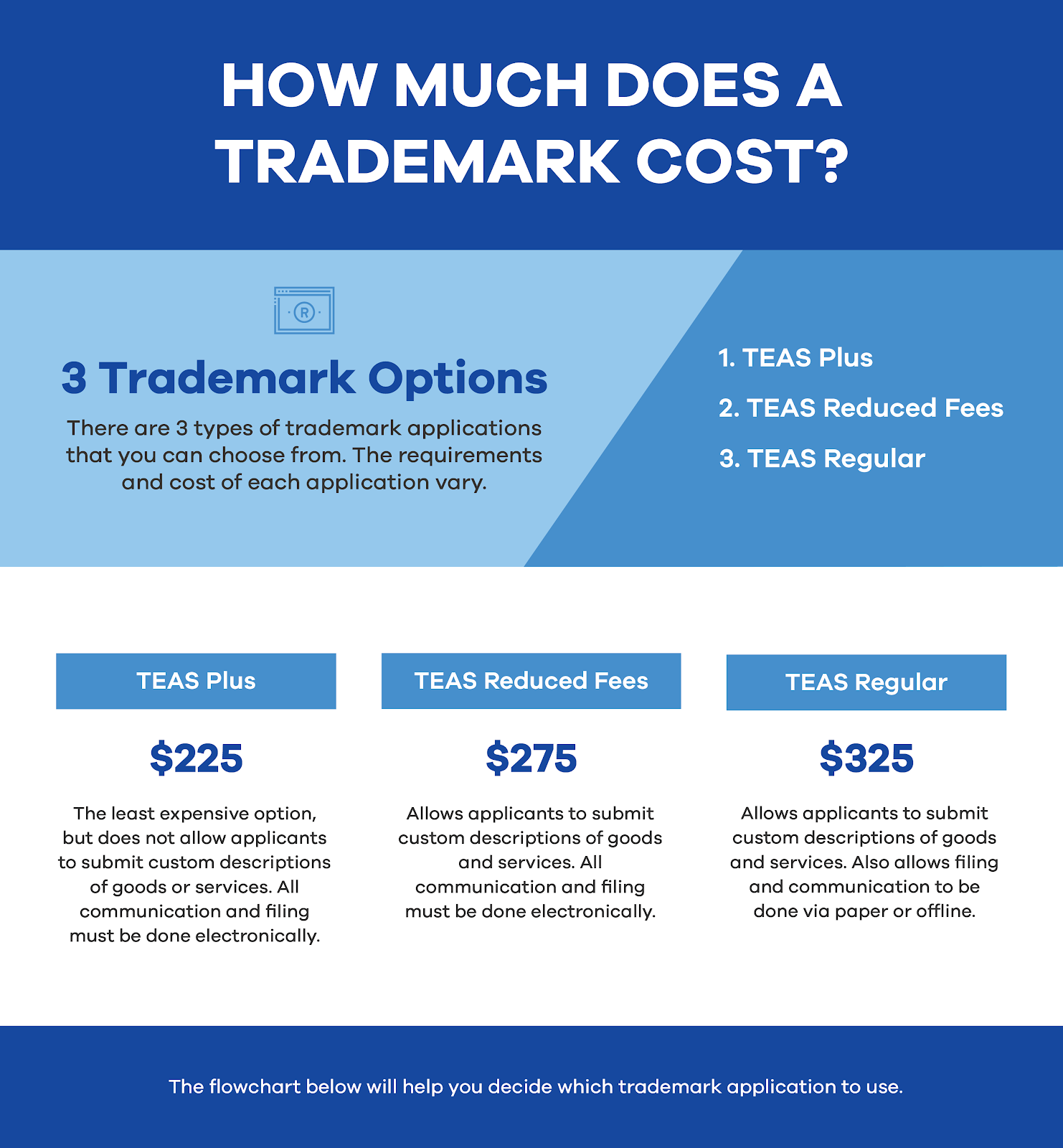
- TEAS PLUS has the strictest requirements with regard to approved goods and services, but come with a reduced fee. Applicants should review the USPTO’s pre-approved goods and services ID manual.
- TEAS RF (reduced fee) applicants aren’t bound to a list of prescribed goods and/or services from the Trademark ID Manual. They also aren’t held to any TEAS Plus requirements, but must agree to electronically file.
- TEAS Regular is the most expensive filing option, but doesn’t come with additional requirements.
File online
The USPTO highly discourages filing a paper application by charging the highest applicable fee for all paper applications (which usually means you’ll pay more than you need to). You’ll save more in fees are by filing electronically.
Visit the Trademark Electronic Application System (TEAS) site at http://www.uspto.gov/teas to register with them directly. Pay by credit card, electronic funds transfer, or through an existing USPTO deposit account.
Trademark FAQs
How do you trademark your online business name?
To trademark your online business name, begin by searching the United States Patent and Trademark Office (USPTO)’s TESS database to see if your idea for a trademark is already taken. When conducting your search, you’ll want to make sure that your potential trademark meets the following criteria:
- Available: Not already registered by someone else with a related product or service.
- Distinct: Not easily confused with an already-registered trademark for a related product or service.
- Non-descriptive: Most adjectives or descriptors such as “Creamy Yogurt” or “World’s Best Bagels” as trademarks will not be accepted by the USPTO.
- Not generic: Generic words or phrases such as “Shirts” for a t-shirt company will not be accepted. The common, everyday name for a product is not trademarkable.
- Not disparaging or offensive. However, while this rule is listed on USPTO’s materials as a possible cause for a trademark being denied, whether or not a trademark can be denied due to profanity or offensiveness is under debate in the courts. Currently, there are quite a few profane trademarks under active registration.
- Easy for customers to spell, pronounce, and remember. Your trademark should be easy for people to spell and remember. Trying to trademark the first 13 digits of Pi as your business name would probably not pass the review process.
How much does a trademark cost?
Trademarking a business name will cost between $225 and $400. How much a trademark costs depends on which type of application you want to use. The United States Patent and Trademark Office (USPTO) charges three different fee levels depending on which application you use. The cheaper the application fee, the more work you’ll be required to do up front, and you’ll be more restricted in the types of products you can list. The differences between the different trademark application types are detailed below, or you can use our How to Choose a Trademark flowchart below to help you decide.

How long does it take to register a trademark?
The USPTO begins their review process after the initial application is filed. Usually, this process takes between 4-6 months and is determined by the number of applicants being reviewed.
If they find an issue with the application, you will need to respond to any request for additional information, which can add up to another six months of waiting. Next, you need to get your trademark published in an official newsletter. This requirement can take up to three months.
Finally, the USPTO will issue a certificate of registration to complete the trademark process. Usually, this step takes 2-3 months to complete. So, how long does it take to register a trademark? All-in-all, the complete process of registering your trademark can take between 11 and 18 months.
How long does a trademark last?
The initial term of a trademark registered with the USPTO (US Patent and Trademark Office) lasts for 10 years.
However, the registration could lapse within those 10 years if you’re not able to show that the trademark is still in use within six years of the initial registration date. To put it plainly, if you can reasonably prove trademark usage for the first six years, your trademark will last through to that 10-year mark.
After that, the registration can be renewed indefinitely for additional ten-year periods if the owner files the required renewal applications (a Section 9 Declaration) with the USPTO.
If you don’t renew your registration, it doesn’t void all rights to the mark, but you will lose all the special benefits of federal registration.
How much does it cost to trademark a business name?
Electronic applications for trademarks currently cost $225–$400 per class of goods or services, depending on which type of application you file. If you want to register using a paper application, that will cost you $600 per class of goods or services.
If you use your mark for multiple classes of goods and services you must pay the filing fee for each of those classes. If your trademark is denied, you unfortunately, do not get those fees back.
Some people hire a lawyer to help them register a trademark. If you decide to do this, be aware of the legal fees you will incur. Most lawyers charge by the hour with rates that can range from about $125 to a few hundred dollars per hour.
You should also keep in mind that you’ll need to pay renewal fees. Every 10 years, you must file an application to renew your trademark registration. Fees for trademark renewals are approximately $300 for an electronic application and about $400 for a paper application.
Can two businesses have the same name?
Yes, two businesses can share the same name, provided that they’re not offering goods or services that are related to one another.
What to do if someone is using your trademark
So you found someone using your trademark. That doesn’t necessarily mean infringement has taken place. It’s only considered trademark infringement when consumers might be confused by the double use of the trademark and whether the trademark is being used on competing goods and services.
Even still, you also want to take into account the location of the other business using your trademark. For example, if you have a donut shop in New Orleans, LA and someone opens up a donut shop in Scottsdale, AZ that has a similar name, this likely isn’t considered infringement because customers in New Orleans won’t accidentally go buy the other donuts in Scottsdale. There won’t be any confusion.
However, ecommerce is muddying the waters a bit in terms of location, and courts may take into consideration how someone’s online presence can impact another’s business.
Should you trademark your logo?
Your company’s logo is one of the most valuable assets your business has. Your logo helps customers recognize you and distinguish you from your competitors. Believe it or not, a company does not need to trademark its logo. If you’re using your logo for commerce, then your company naturally has a trademark on that logo. This is called a common law trademark.
A common law trademark happens automatically, based on said trademark's use in commerce. As soon as a company uses a logo to identify its business, they have trademark rights. Even though common law trademarks are given automatically, registering your trademark does offer more protection.
How to find out if a logo is trademarked
The United States Patent and Trademark Office (USPTO) has a registered trademark look up that identifies brand names and marks that are like yours. Using the Trademark Electronic Search System (TESS), you can search for a mark by name or by design code using the Design Search Code Manual. It’s pretty straightforward to search for direct matches, but the process can get a little complicated since marks can be similar without being identical. The system will not automatically find words that have a similar pronunciation but different spelling.
Because of this, you’ll likely have to conduct several searches using different variations of spelling, as well as all of the design features. Aside from being federally trademarked, a logo can be registered at the state level. It’s a good idea to conduct a search with a state’s secretary of state website. And in some cases, trademark protection can also exist under common law. This means that even if a logo isn’t registered with the state or federal government, it might be subject to trademark protection.
How to trademark a product
The first step to trademarking a product name is to ensure that your mark is in fact registerable. Not every mark is registrable or legally protectable. The USPTO offers more detailed information about selecting marks on its website. Next, you must identify the mark format as either a stylized/design mark, standard character mark, or sound mark. You must also clearly identify what goods and/or services the mark will apply to. After that, search the USPTO database to ensure that your trademark has not already been claimed. The last thing you must determine before applying for registration is your filing basis.
The next step is to prepare and submit your application. After the USPTO has determined that you’ve met the minimum filing requirements, you’ll work with the assigned USPTO examining attorney. This attorney will contact you if you have to make minor corrections to the mark. Finally, you’ll receive approval or denial of your application. If you are approved, remember that you’ll have to maintain your registration to prevent it from expiring. The trademark application process can be complex and confusing—it is recommended that you consult with a trademark attorney to help you through the process.
How to trademark a phrase
Trademarking a phrase is very similar to trademarking a product name. If you have a phrase that is registrable, the first step to getting it approved is to conduct a trademark phrase search. Use the USPTO’s Trademark Electronic Search System to locate phrases identical or similar to yours. If you find no matches, apply for a trademark online using the Trademark Electronic Application System and pay the application fee. Your application must specify whether the phrase is currently in use or intends to be used, whether you are registering your phrase in special or standard character format, and the type of goods and services your mark is used for. If you are registering your phrase as special character, you’ll need to include a picture or drawing.
Once your application has been submitted, make sure that you promptly respond to any USPTO correspondence, like office actions. It might take months for your registration to be approved, provided there are no objections or problems. Once the phrase is registered, you’ll need to maintain your registration by filing periodic documents with the USPTO.
Copywriting your work
Decide if you Need a Copyright
According to the United States Patent and Trademark Office, copyrights protect original works of authorship. If an individual registers their copyright with a public record of their work, nobody will be able to infringe on your claim. Should they attempt to, you will be able to sue them for copyright infringement.
Copyrights are long-lasting for both creators and anonymous individuals. For those directly credited for creating original works, their copyright protection will last for the rest of their life, plus 70 years after death. If the original works were created anonymously, or under a pseudonym, then the works are protected 95 years from the date of publication. They may also be protected for 120 years from the date of creation as well.
Review the Copyright Database
So you want to apply for a copyright. First, you will need to conduct a search through the copyright database. This will ensure that you do not accidentally infringe on any existing registered work. If your work turns out to be unique, all you need to do is file an electronic application, send in a copy of the work you want to register, and pay a fee.
Procure your Patent
If you have created an invention that has a “useful” purpose and the ability to operate, then you’ll need to file for a patent.
Patents require a nonprovisional application filed to the Director of the USPTO. Since these are original inventions, their applications are tailored to those specific needs and include:
- a written document with a specific description
- a formal declaration that you are the original inventor of the creation
- drawings along with fees for filing, search, and examination
Keep in mind that the duration of protection may vary depending on the type of patent that your invention is granted, as not all patents are created the same. A utility patent, for instance, lasts for 20 years, while a design patent will last for 14 years.
The protection of your unique work is key, so once you know which one you need, it’s time to begin the paperwork process to make sure you can protect it for your business.
Part 6: Staying legal and compliant
There are so many things to get right when you’re starting a new business, and a number of things you’ll inevitably get wrong. Every new business owner ends up learning some things the hard way, but you can avoid a lot of potential trouble by listening and learning from other business owners’ mistakes. Follow these at all costs, or it could cost you your business.
Get the right documentation
In the early days of a new business, you have limited funds and are looking for any opportunities to cut costs that you can. You may think you can get by with the cheap and easy corporate documents you can buy online, but that’s a big mistake.
- If you have multiple shareholders, it is absolutely essential to hire a real corporate lawyer—if not during the formation of the business, then as soon as possible after incorporation. Ideally, each shareholder will have their own corporate lawyer.
- If you’re starting a partnership, it’s often tempting when everything’s going well early on to assume that things will stay that way, but that’s a bit short-sighted. For instance, drafting a written agreement with your co-founder is difficult when you guys are just starting. But that is also the most optimal time to do it.
You can hire a lawyer early on to get everything in writing, or you can risk facing higher costs (both financial and emotional) later on if things become contentious.
Apply for the right permits
Every city has rules about where businesses can be located and how they can be run. To make sure you stay on the right side of the law when opening up your business—especially if it’s a business with a storefront—do your research into permits.
Don’t mistake cheap rent for a sure thing without first completing any necessary building and re-zoning permits. For more info on permits, check out Part 2 of this guide.
Choose your name carefully
You’ve probably already figured out that choosing the perfect name for your business is challenging. You want it to be meaningful to what you do, sound good, have an available domain name, and be easy to remember—all of which is hard enough. But there are legal issues you have to consider as well. Do your research to make sure you’re not infringing on any other brand with the same or too similar of a name.
Don’t skip liability insurance
Many small business owners don’t even think about the possibility of being sued by a personal injury lawyer for something like a slip and fall on their property, negligent security, or other types of premises liability case. However, a lawsuit over something that seems small to you could end up ruining your business if you’re not properly covered.
You can further protect yourself by investing in cyber liability insurance, especially if you’re collecting data from customers, selling products on an ecommerce site, etc. This will cover you in the event of future lawsuits on account of a data breach or cyber attack. After all, even if large businesses are bigger targets than you are, it doesn’t mean you’re safe from cybersecurity issues.
Use the right legal structure
A lot of businesses go for the easiest legal option when getting started: an LLC. However, many of them come up against the same common issue eventually; an LLC doesn’t work if you want to raise money from outside investors. Make this mistake, and it could cost you tens of thousands in legal fees.
Keep personal and business separate
This advice is particularly relevant for single business owners. If you co-mingle your personal funds with those of the LLC, you are risking the limited liability characteristics of your company. This means that your personal assets could be at risk to creditors.
Remember that just by being a single owner, you’re also at greater risk of being audited. Because you report your SMB profit/loss on your personal tax return, it is generally subject to more scrutiny than a business one.
If possible, forming a partnership with someone else—even if they only take on a 1% stake in the business—can reduce your risk considerably.
Understand (and respect) copyrights
There are two main ways this hurts new businesses. The first is that they fail to secure the copyright of work that they hire independent contractors to create.
If you pay a third party (as opposed to an employee working within the scope of his or her employment) to create this content for you, it most likely is not a “work made for hire” under the Copyright Act. Just paying for it is not enough under US Copyright laws.
The other main area where copyright matters is with the images you use on your website and social media posts. Many people make the mistake of assuming that if they find an image using a Google image search and it does not have a copyright notice on it, it is free to take and use on your own website or Facebook post.
If only it were so easy. It turns out, the original owner’s copyright is enforceable even if they don’t mark or register it. Don’t risk getting sued for using stock photos on your website that aren’t free to use. Make sure you stick with images you either create yourself or ones you've bought the proper license to use.
Check your employment contract
If you’re leaving behind a full-time job to branch out into starting your own business, you have to be careful. If your new business offers similar services to the company you’re leaving, you could find yourself in legal hot water.
Many employment contracts contain non-competition clauses, meaning that they dictate how and where that person can open their own business and the circumstances under which they can compete with their former employer.
Most businesses will send a threatening letter before taking you to court, which is costly and can be embarrassing for both people. Nonetheless, small business owners face risk and, if they do receive a letter, will want to hire a lawyer at considerable cost to help them with their response.
It’s best to review your contract before you branch out and discuss your options with a lawyer to make sure you start your business on solid legal ground to begin with.
Keep your records organized
Record keeping of personal financial matters is important, but keeping solid records as a small business owner is even more critical. If you fail to maintain an organized, up-to-date set of records and receipts for your books, you could easily lose track of key expenses and also lose out on valuable business tax deductions.
In addition, if you get that dreaded IRS tax audit notice in the mail, you won’t be panicking as much if your bookkeeping records are in good shape. That’s because the IRS generally requires taxpayers to provide proper documentation to resolve an audit.
Categorize your income and expenses appropriately
It’s imperative to always have a good handle on how profitable your business actually is from month to month or year to year. This is where bookkeeping plays a key role. You must track all income and expenditures within specific categories to help you understand the financial success—or lack thereof—of your enterprise. Plus, being aware of how each category of income or expenses is impacted by taxes can help reduce your tax bill. If you fail to adequately measure this information, you could wind up in the red very quickly.
Report sales taxes
In lots of small businesses, making the mistake of failing to account for sales tax is quite common in bookkeeping. But if you make it a point to pay attention to your sales tax requirements, you can avoid falling into this trap.
You should know what your specific sales tax duties are depending on what types of products or services you sell and where you conduct business. There are often city, state, and federal sales taxes to take into consideration. It’s up to you to collect and report sales tax payments. You could wind up incurring hefty penalties if you don’t do this, and your monthly sales figures may be skewed as well, leaving you with inaccurate records and way-too-high profit projections for the future.
Track any reimbursable expenses
If you’re like your fellow small business owners, there’s a good chance you cover certain business expenses with money in your personal bank account. It’s easy for these expenditures to slip through the cracks. Before you know it, you have lost money and have lost out on some important tax write-offs that could reduce your bill from Uncle Sam.
This is why it’s a must to set up a tracking system for all reimbursable expenses you incur through your self-employment work.
Protect your data
In today’s digital world, technology does wonders. But it’s not 100% reliable at all times, and errors can rear their ugly heads at the worst possible times. So, don’t make the mistake of failing to back up and secure your company’s financial data. There are plenty of affordable cloud-based solutions to safely back up your bookkeeping records and other important files.
Enter data carefully
When searching for something online or writing an email to a colleague, how often do you hit the wrong key or misspell a word? We’re all guilty of it. Some websites and programs indicate when there’s an error, but you don’t have this support when it comes to inputting data into your bookkeeping system because the software doesn’t know your business.
This is why you should always triple-check your numbers and ensure they are being entered into the proper accounts and expense categories. You could easily add an extra “0” to the end of a dollar amount, and this one typo could lead to multiple miscalculations down the line. So, only work on your books when you can give them your undivided attention.
A lot of these legal pitfalls are the kind of things you would never know to think about without hearing what someone else has been through. By doing your homework and getting all the legal basics into order from the start, you can save yourself a lot of trouble and expense. Let the hard lessons of other new business owners help you get it right from the beginning.
Part 7. Hiring employees or freelancers
Scaling your business is exciting, but the growing pains can also be stressful. One of the most significant growing pains is often hiring. The decision of when and how to hire can be scary because often it's completely foreign territory. Here are some steps you can take before, during, and after the hiring process to make sure you don’t accidentally violate any of the new legal and administrative obligations you’re now on the hook for.
Set Up Tax Withholding
You’re going to need to register at both the federal and state level before you can bring anyone else on. For now, let’s assume you already registered with your state’s labor department and have an EIN for your business (if not, see Part 3 of this guide). You’ll also need your EIN to set up a payroll system that will withhold taxes for the various government entities that will be expecting a portion of every payroll check you cut.
Make sure you’re set up with a payroll system designed to calculate, collect, and pay Federal Income Tax Withholding, Federal Wage and Tax Statements, and in some cases, State Taxes for every employee you bring onboard.
You can also do them yourself or outsource to an accountant, but you’re still ultimately responsible for making sure the tax bill gets paid.
Get Worker’s Compensation Insurance
To keep you and your employees safe in the event of an on-the-job injury or accident, you’ll need to sign up for worker’s compensation insurance. With very few exceptions (like super small operations), most states will require it. Even if your state is one of the few that don’t, it’s still a good idea to reduce your liability as an employer.
Fill Out Forms and Verifications
Having these forms on hand will expedite the hiring process and ensure that nothing gets lost in the shuffle. It’s a good idea to create employee packets or personnel files with the new hire’s application, offer letter, future annual reviews, and the following documents:
- Form W-4, Employee’s Withholding Certificate, determines the amount of federal income tax that needs to be withheld based on allowances like the number of dependents an employee has. This needs to be submitted to the feds upon completion.
- State withholding forms will vary depending on where you’re registered, but you can access them at bls.gov to see individual state requirements and print the required form(s).
- Form W-9, Request for Taxpayer Identification Number and Certification, ensures that you have all the necessary information for your independent contractors. These are primarily used with freelance or other contract employees who pay their own taxes and have been hired to help with anything from seasonal tasks to long-term overflow.
- IRS Form 940 details your annual federal unemployment tax payments and needs to be filed each year.
- Form I-9, Employment Eligibility Verification, determines a candidate’s eligibility to work in the US. It doesn’t need to but submitted to anyone, but it’s important you keep this document separate from the employee’s personnel file and make it available for inspection for at least the first three years of their employ.
- By January 31 of each year, you’ll need to send a Form W-2 to your employees or 1099 Misc (used to document income paid out each year to contract employees). This details what they made for the year and the amount of taxes that were withheld. You send Copy A of the W-2 or 1099 forms to the Social Security Administration by the end of February.
Be sure to keep all corresponding tax paperwork for a minimum of six years.
Decide on Employee Benefits
Many companies offer health insurance and 401(k) plans as part of their employee benefits package. If you’re a startup who can’t offer these benefits yet, don’t worry. If you are extending employee benefits, you’ll need to walk employees through the enrollment process so their dependents are also covered and beneficiaries have been named.
Check your DOL and OSHA Compliance
If you have a brick and mortar store or central office, remember that different government agencies have different required notices that must be posted in the space. These detail the rights of your employees and can be found and printed from the Department of Labor’s website. Be sure to check if there are any state-specific notices for your area.
You must also comply with any Occupational Safety and Health Act (OSHA) regulations. These are designed to keep your employees safe and mandates that government administrators be notified of serious workplace accidents or injuries.
Put Together an Employee Handbook
There’s no law that says you have to, but it’s a great way to cover the company-specific rules and policies each employee is expected to follow. In it, be sure to specify that employment is at-will unless your state requires a written contract.
Write the Job Description
You’re probably hiring based on a particular bottleneck, lack of in-house skill, or simply because you’re too busy and don’t like doing a particular task. That’s fine so long as you can communicate it in a job post.
Visit other job boards to see the phrasing and general responsibilities other employers have written. Be sure to add your own requirements and specifications for the role, including years of experience and education you’d like the person to have. You can also use platforms like Textio to help you catch any gender-biased words or jargon in your job post.
While you’re at it, do some number crunching and figure out what you can afford to pay your new employee. It’ll be helpful when it comes time to negotiate their salary or hourly rate.
Pick a Recruiting Strategy
There are many recruiting strategies to consider when your business is scaling. Recruiting can be expensive at times, but it doesn’t always need to have a monetary obligation attached to it. Here are some routes to consider when hiring:
Research Contractors
Bringing on contractors (or 1099’s) is a great way to hire extra help if you’re unsure of how long you will need it. As your business is rapidly growing, there can be some uncertainty around how long the pace will continue at that rate. Contractors are great to hire on a project-by-project basis. You can easily find contractors using sites like Upwork to narrow your results, depending on the type of work you need to be completed. There are some legal implications to consider when hiring contractors, so make sure you follow IRS guidelines.
Interview Third Party Recruitment Agencies
There are a multitude of companies to choose from if you want to consider using a third party recruitment agency to assist with building out your team. There are also key advantages to using their services for hiring. Third party agencies will have more knowledge of the industry, and many firms specialize in certain markets. They come with pre-existing knowledge of where the talent is, how to find them quickly, and current salary trends. Agencies sometimes will come equipped with their own network of candidates to pull from at any moment. This allows you to not be solely reliant upon inbound applicants who apply directly to your company. This also can help speed up your time to hire. If speed is a top priority in hiring, using a third party recruiting agency may be your best option.
Consider Interns/College Hires
Never underestimate the value of a great intern! Intern talent tends to be easily attainable. Wherever your company is headquartered, there’s bound to be a nearby university with students who either want an internship to gain experience or actually need an internship for joint course credit. Universities have free job boards where you can effortlessly post available internships at your company. You can also decide if your internships will be paid or unpaid. Over time, if you build a successful internship program, your best interns will want to continue working at your company post-graduation. This is a great way to convert intern talent to full-time, post-college hires. The intern-to-full-time hire model works well for small companies and equally for some of the largest fortune 500 companies.
Put out a Call for Employee Referrals
Employee referrals generally provide the best quality of candidates because great people tend to want to work with other great people. You can count on your employees to refer awesome candidates with whom they feel passionate about potentially working in the future, whether it be an old coworker or someone from their network. Always consider capturing your employees’ networks by gaining employee referrals. One of the best ways to incentivize employee referrals is to create a strong employee referral program. There are many ways to design a successful employee program, so you might want to consider polling your employees to see what type of incentives they would like (ex: money, gift cards, gifts, etc.).
Attend Networking/Meetups
One of the prime ways to build your company brand is to network in your community. The more people who know about you, the better your opportunity to receive inbound applications. A lot of small business owners attend meetups on a regular basis or join networking groups around town to find potential talent. Networking widens the breadth of your reach as a small business, and will eventually pull more candidates into your hiring funnel.
Create Targeted Job Postings
Another insightful way to drive applications is to improve your job postings from a keyword search standpoint. This means making your postings extra targeted toward the type of applicant you’re looking for. You can start the process by thinking of what someone would search for who was looking for a position similar to yours, and then tailor your posting from there. The more targeted the keywords you include in your posting, the better the quality of applicants.
Search on Social Media
Another way to find talent is by using social media outlets like LinkedIn. LinkedIn is full of active job seekers. You can easily leverage your own network of connections on LinkedIn to find people who may be a fit for your company. Facebook also tends to have many grassroots job seeker groups where you can post about open positions at your company for free. It’s also very important that your company have a company page presence on LinkedIn, Facebook, and/or Twitter—this will help build your company brand and, in turn, yield more applicants over time.
More Things to Consider
Before you start hiring, it’s vital that you evaluate your current team of employees. There may be some people that deserve a promotion to a higher level position and/or management role. Promoting and hiring from within is a great mark of a successful company. It’s also a bit simpler to find entry-level talent than senior level or management talent.
Another critical component to consider is your company brand. Evaluate what your company brand looks like in its current state, and work on building your brand every day. Branding is a continued effort, but it’s extremely important when you want to increase your inbound applicant traffic.
The next vital component is company culture. You want to create a fantastic culture that makes people want to work at your company. Company culture definitely builds over time, but it’s always a good idea to regularly poll your employees to get a better idea of what they like and dislike about working at your company.
Finally, the most crucial and easily overlooked component is employee retention and turnover. It’s extremely expensive to replace employees who leave your company. Valuable employees who leave can cost your company thousands of dollars when you consider the loss of knowledge and experience during the time of finding and training new talent. Look at ways you can help retain your employees, such as company perks or awesome benefits.
Choose your Candidates Wisely
Hiring a new employee or freelancer to work for your online store is a big decision. No matter what role they’ll be in, they’ll have an effect on how your business runs and the overall atmosphere your other employees work in. A bad hire will waste time and money, and will set your business back for the time it takes to find a replacement.
When hiring someone new, the first thing to look to is the work history described on their resume and whether they have relevant experience. To find the right candidate, you need to look beyond how they look on paper. Read between the lines and assess candidates based on these important factors:
1. Their Basic Manners
Someone can be entirely competent for the role, but if they’re rude and inconsiderate to your other employees—or worse, your customers—then their attitude can offset anything good about the quality of their work. It can be hard to pin down a job candidate’s manners in a job interview though—people are likely to be on their best behavior when they come to the office to meet you.
As a way to get a glimpse of a candidate’s personality in action, consider scheduling at least one interview outside of the office, such as a breakfast or lunch interview, and pay attention to how they talk to the wait staff, their table manners, cell phone usage, etc. By interacting with them in a less formal context, you can gain some insights into how they generally behave and see any warning signs that might alert you to their not being a good choice.
2. Their Integrity
The job market is competitive and, unfortunately, some candidates do exaggerate or misrepresent their skills as a way to get their foot in their door. That means the resume alone may not provide an accurate snapshot of the knowledge or experience a candidate really has.
You can use the interview not only to confirm if their actual experience matches what you need, but also to get an idea of their integrity. A job candidate that oversells themselves in a job interview may display dishonesty on the job as well.
In contrast, a candidate that’s willing to admit what they don’t know so they can learn will be much more valuable to your business than one that claims to know more than they do.
3. Their Motivation
While money is a perfectly understandable motivator—we all have to work to live—you ideally want to find a candidate that feels some draw to the business and job beyond the salary. Someone that cares about building a career, has a passion for what your company does, or genuinely enjoys the kind of work they’re applying to do will be a more committed candidate than someone who spends their time on the job just waiting for the workday to end.
4. Their Preparation
A good job candidate won’t just see their role in the interview as answering questions you ask—they’ll know the interview should go both ways.
If the candidate spends a lot of the meeting asking about the company and position, it shows that they have a real eagerness to learn about your business and that they’re willing to put a little extra work in beyond the bare minimum required for a job interview.
5. Their Loyalty
High turnover rates are the bane of hiring managers’ existence and bad for the company as a whole. That’s why it's important to hire people who are loyal and looking to be a part of something for the long term.
While it’s impossible to tell for sure during a job interview whether or not a candidate is likely to stick with your company in the long term, you can see some evidence in the level of interest they show in the job interview (see also #4) and their overall job record. If they have a history of leaving every job they start within a year and don’t have a good explanation, that could be a bad sign.
6. Their Adaptability
While a big part of hiring is making sure a job candidate is qualified for the job they’ve come in for, in practice, most jobs end up spanning responsibilities beyond what’s laid out in the job description.
Adaptability means a candidate will be able to come into the position and make it his or her own. To get a feel for how adaptable a job candidate is, ask about how they’ve responded in past jobs when tasks came up that they didn’t expect, or present an example of unexpected responsibilities one of your employees has faced and ask what they would do in that scenario.
7. Their Self-Awareness
Self-awareness is something you should be able to spot in the way a candidate answers questions about how they take feedback. If you have valid feedback, sharing it with them can give you insights into how they’ll react on the job. It may also come out if you express honest concerns about something in their job history or provide constructive criticism for their resume, cover letter, or performance in the interview. Don’t make criticisms just to see what they’ll do, but if you have valid feedback, sharing it with them can give you insights into how they’ll react on the job.
8. Any Signs of Discriminatory Thinking
If you bring in someone who discriminates against co-workers or customers based on race, gender, age, sexuality, marital status, or really anything, you’ll have personnel and customer service problems because of it. Some job candidates won’t reveal their problem prejudices early enough for you to avoid hiring them, but do your best to pay attention to any signs of discriminatory thinking.
9. Their Fit with Your Company
Hiring decisions are best made based on our cultural values. Many successful businesses put that right in the job description.
You might also want to create a profile of what your ideal employee would be like. Include both professional experience and personality traits that you hope to find that will enhance your company culture. That will both help you craft a better job posting and come into interviews with a clearer idea of what to look for.
10. Your Gut
You can do everything right and conduct multiple interviews, but ultimately there’s one other important thing for you to pay attention to during the hiring process: your gut.
It’s easy to let interviews and shiny resumes sway you, but your intuition can keep you from hiring those you may not feel are compatible with the team.
If something about a candidate feels off to you during the interview, don’t talk yourself out of the feeling. It’s probably there for a reason. On top of everything else you consider when making your hiring decision, factor in what your gut is telling you.
Conduct a Background Check
Pre-employment screenings are a common part of the candidate selection process. It’s really the only way to know that a potential hire is who they say they are. Make sure you get authorization to conduct a background check before performing one, and check with a legal professional about the requirements and restrictions in your state.
Contact Your State's New Hire Reporting Agency
New hire reporting agencies vary by state, but the general idea is to collect information to ensure parents who owe child support don’t fly under the radar. In the event there is a debt to pay, you may be asked to work with these agencies to set up garnished wages.
There are several important legal and administrative tasks necessary when hiring a new employee. Though the process and can feel foreign and intimidating, it’s more than manageable if you follow these prescriptive steps. Use them to cover your bases lest your deadlines fall behind simply because there isn’t enough manpower to support the work.
You're ready for business!
Don’t let the process of setting up your company keep you from taking your career by the horns. Follow this guide, and soon you’ll be promoting your new business and processing orders.
 from Volusion Ecommerce Blog | SMB Marketing, Design, & Strategy https://ift.tt/3bEWuV5 via IFTTT